



Key Takeaways
- Nearly 70% of online shoppers abandon their carts, making recovery a major ecommerce opportunity.
- Klaviyo abandoned cart flows generate $3.65 per recipient on average, while top brands reach $28.89.
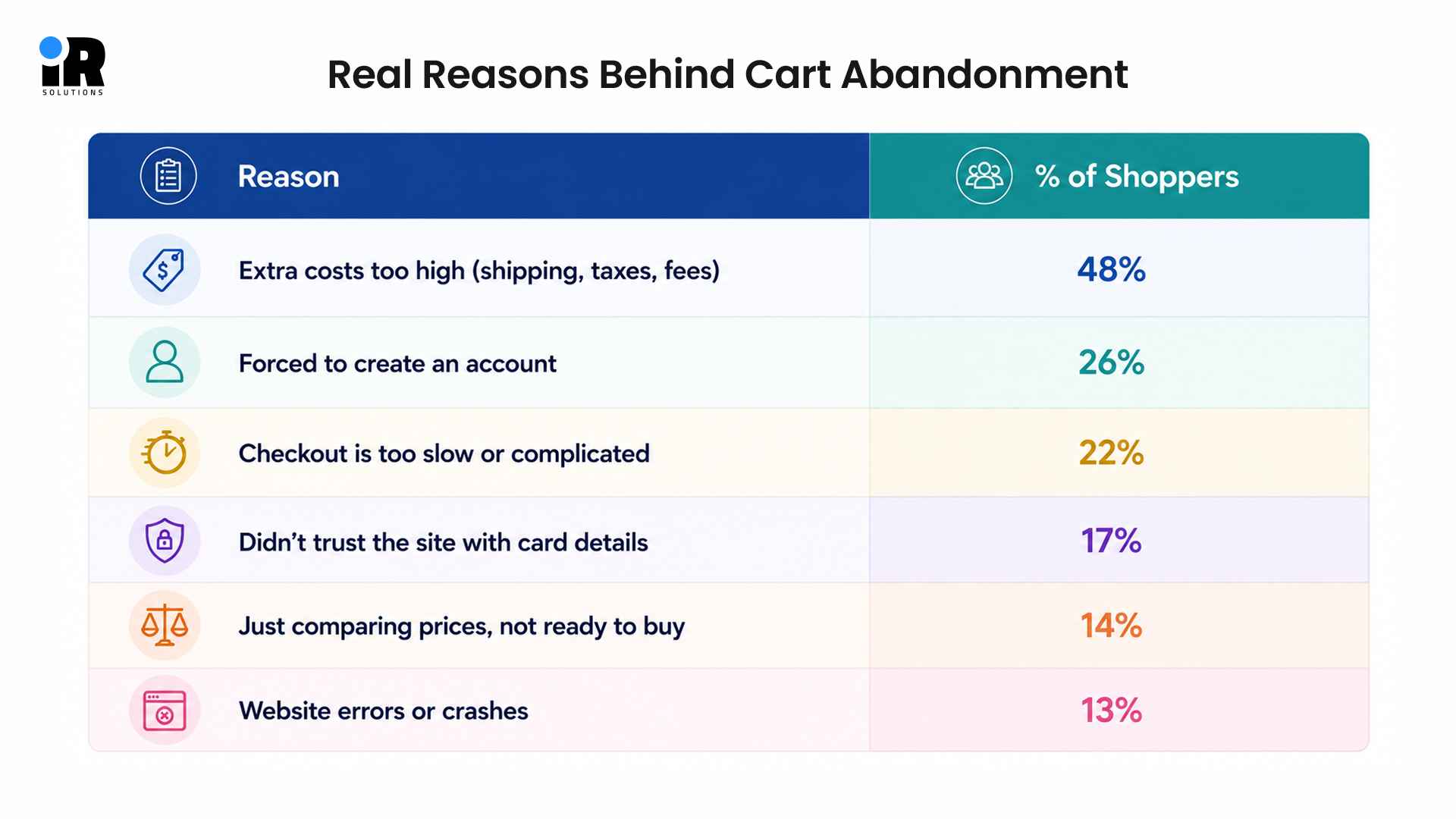
- Cart abandonment is driven by issues like 48% citing extra costs, while 26% dislike forced account creation.
- Connect your store, enable tracking, sync customer data, and verify events before launching your flow.
- Use a three-email sequence that reminds shoppers, reinforces product value, and creates urgency.
- Personalisation, dynamic products, segmentation, testing, and timely follow-ups can improve recovery performance.
Nearly 70% of online shoppers add products to a cart and leave without buying. That is not a rounding error. For ecommerce businesses, it is real revenue walking out the door every single day. Klaviyo email automation is one of the most effective tools available to recover those sales.
According to Klaviyo's abandoned cart benchmark report, abandoned cart flows drive the highest average revenue per recipient of any automation, sitting at $3.65 per recipient. Top-performing brands in the upper 10% push that number to $28.89 per recipient from the same flow. That kind of return does not happen by accident. It comes from emails that are timed correctly, personalised properly, and structured with a clear purpose behind every single send.
Klaviyo tracks shopper behaviour directly on your website. When a known contact adds items to a cart and exits without purchasing, it triggers an automated email sequence. Each email is personalised based on what the shopper left behind. It reminds them of their cart, builds trust in your brand, and gives them a reason to return.
The average abandoned cart flow also delivers a conversion rate of 3.33%, which is the highest order rate across all automated flows inside Klaviyo. Top-performing stores push click rates to 12% and order rates close to 7% on their best sequences. These are not estimates pulled from thin air. They come from real stores running real flows across thousands of sends every day.
A well-structured abandoned cart flow does four things well. It reaches shoppers at the right time and shows them exactly what they left behind. It addresses the most common purchase hesitations without feeling heavy-handed. And it guides people back to checkout in a way that feels helpful rather than pushy.
This guide covers everything you need to run a successful abandoned cart strategy inside Klaviyo.
What Is Klaviyo Abandoned Cart Email Automation?
Abandoned cart automation is not just a single email. It is a trigger-based sequence that responds to shopper behaviour in real time. When someone adds a product to their cart and leaves without buying, Klaviyo detects that action and starts sending emails automatically.
How Abandoned Cart Automation Works
When a shopper visits your store, Klaviyo tracks their activity through cookies and profile data. Once a known contact adds items to a cart and exits without purchasing, the system fires a trigger event. That event starts your abandoned cart flow.
Each email in the flow goes out at a pre-set time delay. The first email might go out one hour later. The second, 24 hours after that. The third, 48 to 72 hours later. The content of each email can change based on what products the shopper left behind.
Abandoned Cart vs. Abandoned Checkout
These two are often confused, but they track different behaviours.
Both flows have different purposes but work best when running together. An abandoned cart email catches shoppers before they even reach checkout, while an abandoned checkout email closes the gap for those who nearly made it. Setting up both in Klaviyo means fewer missed opportunities at every stage of the buying journey.
Why Use Klaviyo for Abandoned Cart Recovery?
- Klaviyo connects directly to your store and pulls in product data, customer history, and behaviour without any manual work on your end.
- Unlike generic email tools, it drops real product images, names, and prices into every email automatically so each message reflects exactly what the shopper left behind.
- Most email platforms cannot match that level of detail, and shoppers notice it immediately.
- The result is recovery emails that feel relevant and timely rather than copy-pasted blasts going out to everyone on your list.
These automations perform even better when paired with professionally built ecommerce website development services that provide fast, reliable shopping experiences.
Why Do Customers Abandon Their Carts?
Many customers add products to their cart with the intention of buying but leave before completing their purchase. Identifying the reasons behind this behaviour helps you make better improvements to your store.
Here are the most common causes of cart abandonment.
Unexpected Costs
Customers add items at one price, then see the total jump unexpectedly at checkout. Shipping fees, taxes, and handling costs catch people off guard, and they leave without buying. Showing total costs earlier in the shopping experience can reduce drop-off significantly, without needing to offer a discount.
Complicated Checkout
When checkout takes more than five steps, many customers give up before completing their purchase. Asking customers to create an account before checkout can make the buying process more frustrating.
Every extra click is another opportunity for someone to close the tab and move on. Klaviyo's abandoned checkout flow can send a direct link back to exactly where the customer dropped off.
Payment Security Concerns
Customers who do not recognise your brand may hesitate before entering their card details on your site. This concern is especially common for newer or smaller stores that have not yet built a strong reputation.
Recovery emails that include trust signals like verified reviews, secure payment logos, or a money-back guarantee help close that gap effectively.
Comparing Prices
Some buyers use their cart like a wish list, adding items across multiple sites before deciding where to buy. Your recovery email is a real opportunity to remind them what made your product worth considering in the first place.
Lead with benefits and what sets you apart, not just the price tag.
Technical Issues
Slow pages, broken buttons, and checkout errors create genuine frustration for customers trying to complete a purchase. Many of them leave after a bad experience and do not always find their way back to your store.
Monitoring your site speed and checkout flow regularly is worth doing alongside your email automation setup.
What Should You Check Before Launching Your Klaviyo Abandoned Cart Flow?
Before launching your Klaviyo abandoned cart flow, make sure everything is set up correctly. Your store connection, tracking, customer data, and event tracking all need to work together. Checking these essentials first helps your emails send at the right time and display the correct products.
Connect Your Platform
Klaviyo integrates directly with Shopify, WooCommerce, BigCommerce, and other major platforms. Stores running WooCommerce can benefit from experienced WooCommerce developers when custom features or advanced Klaviyo integrations are needed. The integration takes around 15 minutes and syncs your product catalogue, customer records, and order history automatically.
Without this connection, your emails cannot pull in product data. Go to Integrations in Klaviyo and find your platform to get started.
Enable Klaviyo Tracking
Klaviyo's tracking script needs to be active on your site. This script identifies visitors and logs their behaviour, including product views, cart additions, and checkout activity.
Sync Customer Data
Your customer and subscriber lists need to be in Klaviyo before the flow can run properly. Import your existing contacts and make sure email consent is recorded correctly for compliance.
Verify Event Tracking
Before you publish the flow, make sure Klaviyo is tracking the correct events from your store. Test the process by adding a product to your cart, then go to Analytics > Event Timeline and confirm that the "Added to Cart" event appears.
If the event is not recorded, your abandoned cart flow will not trigger correctly, so it is important to fix any tracking issues before going live.
How to Set Up a Klaviyo Abandoned Cart Email Flow
Setting up an abandoned cart flow in Klaviyo is easier when your store and tracking are already connected. The process includes choosing the right trigger, adding filters and delays, creating email content, and testing everything before launch. Once configured correctly, the flow can automatically recover lost sales with minimal effort.
Create a Flow from the Library
Klaviyo provides a pre-built abandoned cart template that gets you started quickly and correctly.
- Navigate to Flows in Klaviyo and click Create Flow to begin.
- Choose Browse Ideas and search for "Abandoned Cart" in the library.
- Select the pre-built template to save time and start with a proven structure.
Choose the Correct Trigger
The trigger event tells Klaviyo exactly when to start sending recovery emails to a shopper.
- Set the trigger event to "Added to Cart" for standard cart abandonment flows.
- Add a trigger filter so the flow only runs when no order follows.
- For checkout abandonment, use "Started Checkout" as a separate flow trigger.
Configure Flow Filters
Flow filters protect your contacts from receiving irrelevant emails after they have already purchased.
- Add a filter that excludes anyone who has placed an order since triggering.
- This prevents sending cart reminders to customers who already completed a purchase.
- Exclude contacts who entered this flow within the last 30 days as well.
Customise Email Content
Each email in your sequence needs a distinct purpose to guide the shopper back to checkout.
- Email 1 should remind, Email 2 should build value, Email 3 should create urgency.
- Pull in dynamic product blocks showing the exact items left in the cart.
- Include product images, names, and prices to make each email feel relevant.
Enable Recommendations
Enable recommendations to display products based on what each customer added to their cart.
- Use the product feed block in Klaviyo's email editor to add recommendations.
- Klaviyo pulls the shopper's cart items automatically into the email template.
- This personalises every email without needing any manual content updates.
Test Before Publishing
Testing before launch catches broken links, missing images, and trigger errors before they reach real shoppers.
- Use Klaviyo's Preview feature to send yourself a test version of each email.
- Click every link and confirm the CTA button leads to the correct cart page.
- Trigger the flow with a test email address to verify timing and event tracking.
Turn the Flow Live
Once testing is complete, activating the flow means it runs automatically for every new trigger event.
- Change the flow status from Draft to Live once all testing is complete.
- The flow will now fire automatically whenever the trigger event is detected.
- Use manual review mode initially if you want to approve sends during the first week.
A successful email strategy includes more than just an abandoned cart flow. Our guide to building high-converting Klaviyo email flows shows you how to create automations for every stage of the customer journey.
Build an Effective Abandoned Cart Email Sequence
The sequence of emails matters as much as the content inside them. Each email should serve a different purpose.
Email 1 (Gentle Reminder)
Sent: 1 hour after cart abandonment
This email does one job, it reminds the customer what they left behind. Keep the tone light and helpful, assume they just got distracted rather than that they changed their mind.
Subject line ideas:
- "You left something behind"
- "Your cart is waiting for you"
- "Did something come up?"
What to include:
- Product image and name
- Price
- A single clear CTA: "Return to your cart"
- No discount yet it is too early
Email 2 (Reinforce Value)
Sent: 24 hours later
If they did not come back after the first email, give them a reason to care. This email reinforces why your product is worth buying. Use social proof here.
What to include:
- Customer reviews or star ratings
- Product benefits (not just features)
- A reminder of your returns policy or guarantee
- Trust badges or payment security icons
- The same product block from Email 1
Email 3 (Create Urgency)
Sent: 72 hours later
This is your last attempt, now is the time to introduce a light incentive or create a reason to act now. Stock scarcity, a limited discount, or an expiry notice all work well here.
What to include:
- Low stock notice (if true)
- A time-limited discount code (optional)
- Final CTA with urgency language
- A brief value recap in two or three bullet points
If you need help setting up or improving your abandoned cart automation, talk to our team and discuss the best approach for your ecommerce store.
What Are the Best Practices for High-Converting Cart Recovery Emails?
A well-planned cart recovery email does more than remind customers about their cart. It should feel personal, build trust, and make it easy for them to return and complete their purchase. Small improvements in your emails can lead to better open rates, more clicks, and higher sales.
Personalise Every Email
Use the customer's first name and mention the exact product left behind to make every email feel relevant. Personal emails create stronger connections, improve open rates, and encourage customers to return and complete purchases.
Use Dynamic Product Blocks
Dynamic product blocks automatically display the exact items customers left behind with updated images and prices. This makes every email more relevant, helping customers quickly recognise products and return to their carts.
Write Compelling Subject Lines
A clear and engaging subject line encourages customers to open your email instead of ignoring it completely. Keep it short, natural, and focused on reminding customers about their unfinished purchase.
High-performing examples:
- Question: Still thinking it over?
- Personalised: [First Name], your [Product] is waiting
- Benefit: Free returns on everything in your cart
- Urgency: Only 3 left. Complete your order today.
Keep One Clear CTA
Use one clear call to action that directs customers back to their abandoned cart without distractions. A single button makes the next step obvious and increases the chances of completing the purchase.
Add Reviews and Trust Badges
Customer reviews and trusted payment badges help remove doubts before customers decide to complete their purchase confidently. Display them near your product details and call to action for maximum impact.
Optimise for Mobile
Most customers read emails on mobile devices, so every email should work perfectly on smaller screens. Use readable text, responsive images, and large buttons that customers can easily tap.
Avoid Early Discounts
Sending discounts too early can encourage customers to abandon carts while waiting for future promotional offers. Let product value and timely reminders recover sales before offering any special discount.
Maintain Brand Consistency
Use the same colours, fonts, logo, and style throughout every recovery email to build customer confidence. A familiar design creates trust and provides a smooth experience from email to checkout.
How Can You Improve Your Klaviyo Cart Recovery Automation?
Setting up a basic abandoned cart flow is only the beginning. Advanced automation helps you send more relevant messages based on customer behaviour and shopping habits. These small improvements can increase engagement, recover more carts, and improve your overall conversion rate.
Split Customers
First-time customers often need more trust before completing purchases, while returning customers usually need fewer reminders. Create separate email paths for each group, so every customer receives messages matching their shopping experience.
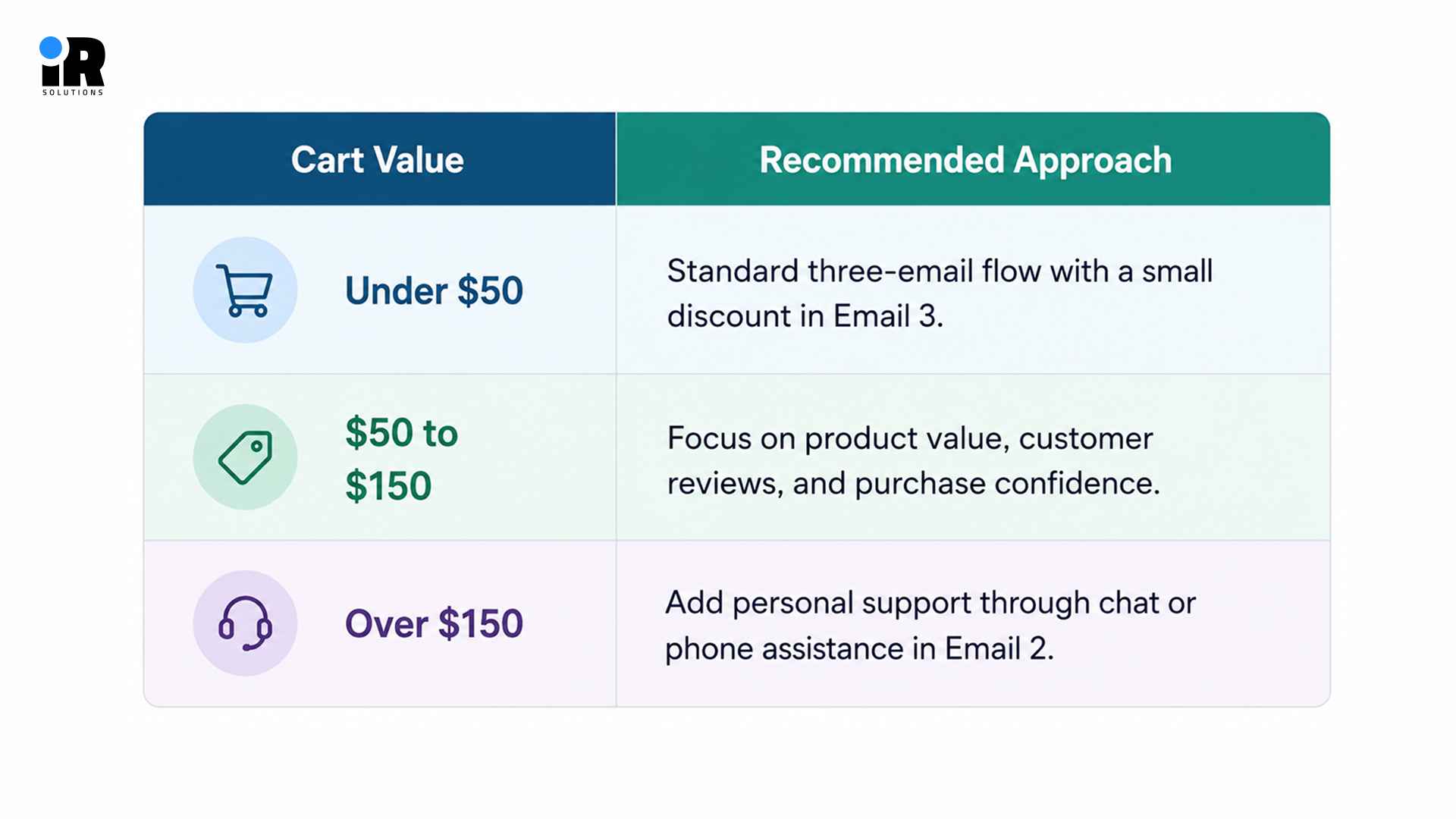
Match Cart Value
Customers with higher value carts often expect more personalised communication before completing their purchases with confidence. Adjust your email content based on cart value to encourage more conversions without relying on discounts.
Use Conditional Splits
Conditional splits help you send different emails based on how customers interact with your previous messages. Customers who opened emails need different follow-ups than those who never opened your first email.
Combine Email
Using email and SMS together helps you reach customers through different channels before they forget purchases completely. Send a short SMS before your second email to remind customers about their abandoned shopping cart.
Recover Browsers
Many visitors leave without adding products, creating missed opportunities that standard cart recovery emails cannot capture. Browse abandonment emails remind customers about viewed products and encourage them to return before losing interest.
Exclude Buyers
Remove recent buyers from abandoned cart emails to avoid sending unnecessary reminders after successful completed purchases. This keeps your automation relevant, improves customer experience, and prevents confusion after checkout.
Your Klaviyo strategy should cover more than abandoned carts. Explore these top Klaviyo flows to engage customers throughout their journey and create more opportunities to grow revenue.
How to Measure the Success of Your Abandoned Cart Flow
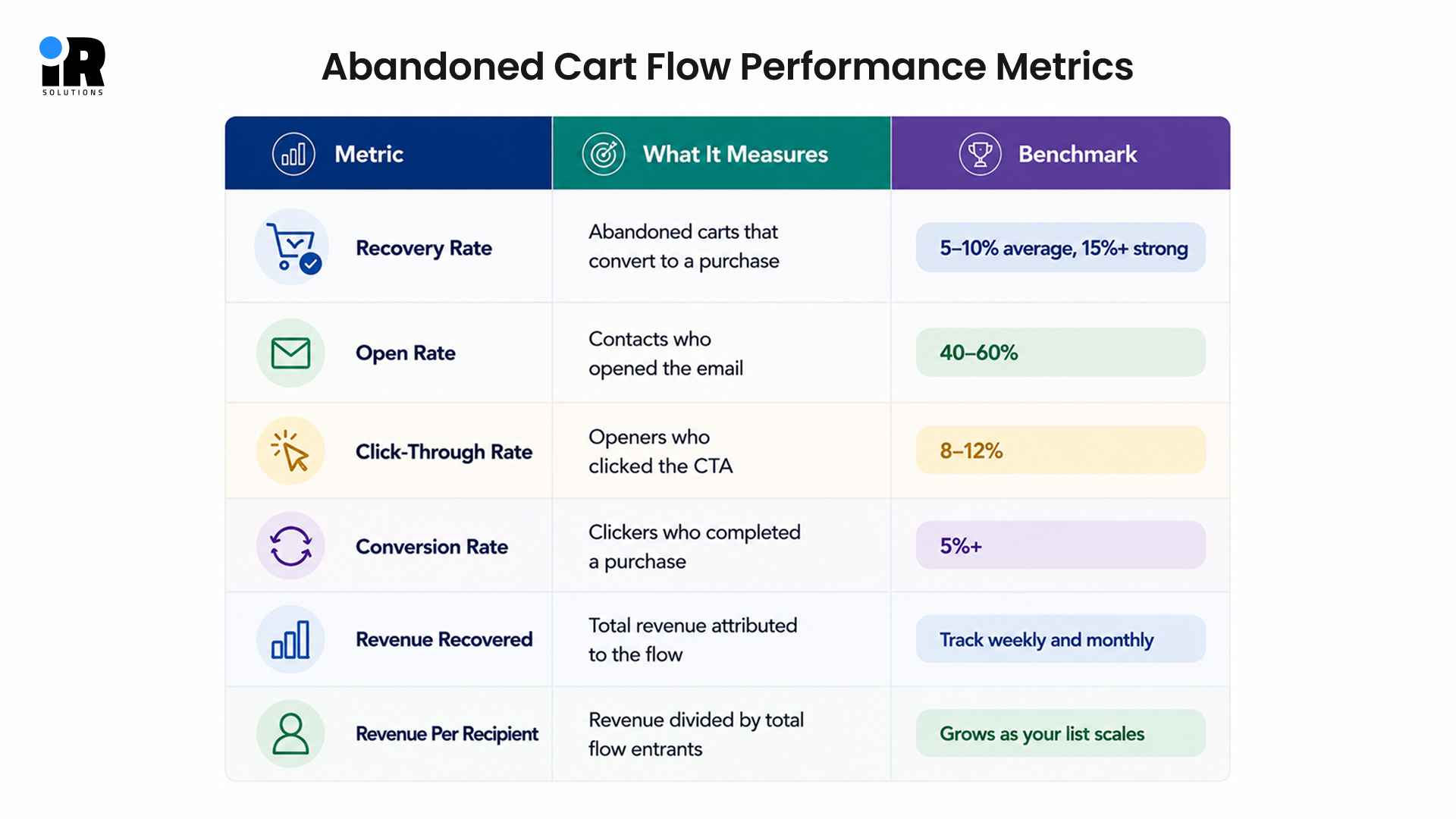
Tracking the right numbers tells you what is working and where your flow is losing people. Without these metrics, you are guessing. Here are the key figures every Klaviyo abandoned cart flow should be measured against.
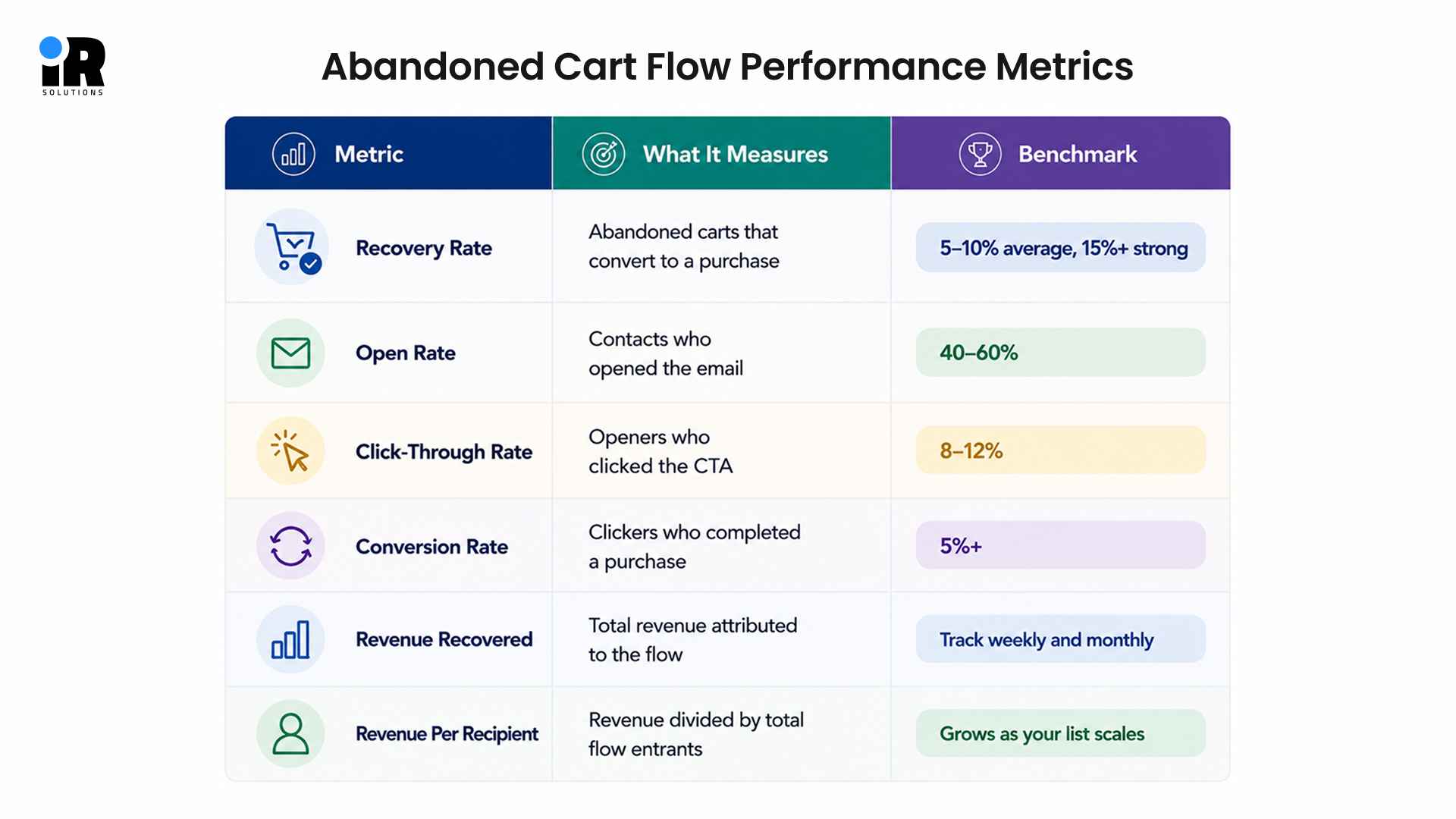
- Recovery rate shows how many abandoned carts your flow turns into real sales.
- Open rate reveals whether your subject lines are compelling enough to get noticed.
- A low click-through rate usually points to a weak CTA or unclear product block.
- Conversion rate measures the quality of your email content and the checkout experience.
- Revenue recovered is the total income your flow generates, tracked weekly and monthly.
- Revenue per recipient helps you forecast impact as your email list continues to grow.
- Go to Flows > [Your Flow] > Analytics in Klaviyo to find all these numbers in one place.
- Review your flow performance at least once a month and adjust based on what you see.
Common Abandoned Cart Automation Mistakes to Avoid
Most abandoned cart flows do not fail because of bad strategy. They fail because of small setup errors that quietly kill performance over time. Things like sending emails too late, skipping segmentation, or forgetting to filter out recent buyers all add up. Knowing what to avoid saves you from fixing problems after the damage is already done.
Sending Emails Too Late
Waiting 24 hours to send the first email is too long. By then, most shoppers have moved on or bought elsewhere. Send Email 1 within one hour of abandonment for the best results.
Using Too Many Discounts
Discounts reduce your margin and train customers to wait for deals. Use them rarely, only in the final email and only if needed to close the gap.
Ignoring Segmentation
Sending the same email to every abandoned cart leaves a lot of performance on the table. First-time visitors, returning customers, and high-value shoppers all need slightly different messaging.
Forgetting to Test
Untested flows have broken links, missing images, and faulty triggers more often than people expect. Always run a full test before going live.
Missing Dynamic Content
If your emails show generic product placeholders instead of what the shopper actually left in their cart, your recovery rate will suffer. Confirm that dynamic product blocks are pulling the correct data from your integration.
Sending After a Purchase
This happens when flow filters are not set up correctly. A customer buys, then receives a cart reminder. It feels careless. Always filter out recent purchasers.
Not Optimising Subject Lines
Many brands write one subject line and never change it. A/B test your subject lines every 60 to 90 days. Small changes here often produce the biggest lift in open rates.
Getting your recovery emails into the inbox is just as important as writing them well. Read our Klaviyo deliverability guide to improve your sending performance.
Conclusion
Abandoned cart emails are one of the most effective ways to recover lost ecommerce revenue, and Klaviyo makes the process simple with powerful automation and personalization. A well-structured three-email sequence, combined with the right timing and messaging, can recover more sales while creating a better shopping experience.
The best results come from getting the fundamentals right. Connect your store correctly, personalize every email, monitor key performance metrics, and continue testing to improve your recovery rates over time. If you want stronger email automation from the start, our Klaviyo automation services help create and optimize email flows tailored to your business goals. With the right strategy in place, your abandoned cart flow becomes a consistent revenue driver for your ecommerce store.
Frequently Asked Questions
How many abandoned cart emails should I send?
Most ecommerce stores recover the highest number of abandoned carts with a three email sequence. Send the first email within one hour, the second after 24 hours, and the third after 72 hours.
What is the best time to send an abandoned cart email?
Send the first email within one hour of abandonment. Beyond that, timing depends on your audience. Morning sends (8–10 AM local time) and early evening (6–8 PM) tend to perform well. Test both with your audience to see which works better.
What is the difference between abandoned cart and abandoned checkout in Klaviyo?
An abandoned cart triggers when someone adds a product to their cart but does not begin checkout. An abandoned checkout triggers when someone starts the checkout process but does not complete the purchase. Both are worth automating, but they use different triggers and usually need different messaging.
Does Klaviyo work with Shopify abandoned cart recovery?
Yes. Klaviyo integrates directly with Shopify and replaces Shopify's built-in abandoned checkout emails. The Klaviyo integration gives you more control over timing, content, segmentation, and reporting than Shopify's native feature.
Should I include a discount in every abandoned cart email?
No. Offering a discount in every email trains shoppers to abandon carts on purpose. Reserve discounts for Email 3 only, and only if your margins support it. Focus on value and trust in Emails 1 and 2.
Can I combine email and SMS for cart recovery?
Yes, and it works well. Adding an SMS touchpoint alongside your email sequence increases recovery rates for many brands. Keep SMS messages short and direct. Include a link back to the cart and send it at a slightly different time than your email to avoid doubling up.
How do I know if my abandoned cart flow is working?
Look at four numbers: open rate (aim for 40–60%), click-through rate (aim for 8–12%), conversion rate (aim for 5%+ from click to purchase), and total revenue recovered. Klaviyo's flow analytics page shows all of these in one place.
What is the average abandoned cart recovery rate?
The average across ecommerce is roughly 5–8% of abandoned carts recovered. Stores with well-optimised flows, good timing, strong personalisation, and regular testing often reach 10–15%.