


Key Takeaways
- Send an order confirmation as soon as your store accepts the order.
- Share the tracking link once the carrier collects the parcel.
- Let customers know when delivery is delayed and when you’ll update them.
- Tell customers how much you refunded and when it should appear.
- Test your emails on a phone and check for broken links or duplicate messages.
- Keep order updates separate from offers and other marketing emails.
A customer pays for their order and checks their inbox, but there’s no confirmation from your store. They’re left wondering whether the order went through, and some will contact support before you’ve started packing it.
Send a confirmation that shows what they bought, what they paid, and where to go if something looks wrong. Follow up when their parcel ships, and let them know if a delay changes when it’s due.
Your ecommerce welcome series can help shoppers decide to buy, but your order emails show them what to expect once they’ve paid. Here’s what to send from checkout to delivery, including what to say when an order is delayed or refunded.
What Are Transactional Emails in Ecommerce?
Ecommerce transactional emails are automatic messages your store sends when a customer takes an action or their order status changes. They confirm purchases, share tracking details when orders ship, and let customers know when a refund has been issued.
Some updates ask the customer to do something, like correcting a delivery address or retrying a failed payment. When that happens, tell them what to do, when to do it, and what happens if they miss the deadline.
Transactional Emails vs. Marketing Emails
The easiest way to understand transactional vs marketing emails is to ask whether the message serves an existing order.
Transactional emails | Marketing emails |
Confirm an order | Promote new products |
Share delivery updates | Recommend related products |
Confirm a refund | Encourage repeat purchases |
Explain payment issues | Announce special offers |
For example, a customer buys a winter coat as a guest and leaves the newsletter box unchecked. They still need a tracking link so they can see when their coat will arrive.
A discount offer for matching gloves is a marketing email. Send it separately to customers who can receive offers from your store.
Why Transactional Emails Matter After Checkout
Before checkout, shoppers compare prices and products, while afterward their questions shift to what happens to their order. Your emails can answer those questions while the order details are still fresh and mistakes are easier to fix.
- Purchase Confirmation: Show what the buyer ordered and paid, so they can flag a wrong item before packing starts.
- Delivery Updates: Give customers a tracking link and an honest estimate, especially when they need to arrange someone’s availability.
- Customer Confidence: Use your store’s name and familiar contact details so first-time buyers recognize who is handling their order.
- Fewer Questions: Answer the questions your team hears most often, including when an order is due or how returns work.
- Repeat Purchases: Make the first order easy to follow so customers know what kind of service to expect next time.
If an order ships in two parcels, list the items in each shipping email and include its tracking link. When the first parcel arrives, the customer can check which items are still on the way.
6 Transactional Emails Every Ecommerce Store Should Have
These transactional email examples show what to send when customers pay, track a parcel, or return an item. The messages your store needs depend on how you take payments, ship orders, and handle returns.
Send when | Include | Customer benefit | |
Order confirmation | Store accepts the order | Items, total, address, payment status | Checks the purchase |
Payment update | Payment succeeds, fails, or changes status | Amount, current status, next step | Knows whether action is needed |
Dispatch notice | Parcel is handed over or carrier confirms movement | Carrier, tracking, items, estimate | Follows the parcel |
Delay notice | Expected delivery changes | Known reason, new estimate, support | Plans around the change |
Delivery notice | Carrier records delivery | Status, available proof, problem reporting | Finds or reports the parcel |
Return or refund update | Return or refund reaches a milestone | Status, amount where relevant, next step | Knows what remains open |
If customers pay in full at checkout, you can include the receipt in the same email as the order confirmation. If you take deposits or ship items separately, send an update when the balance is paid or each parcel ships.
1. Order Confirmation Email
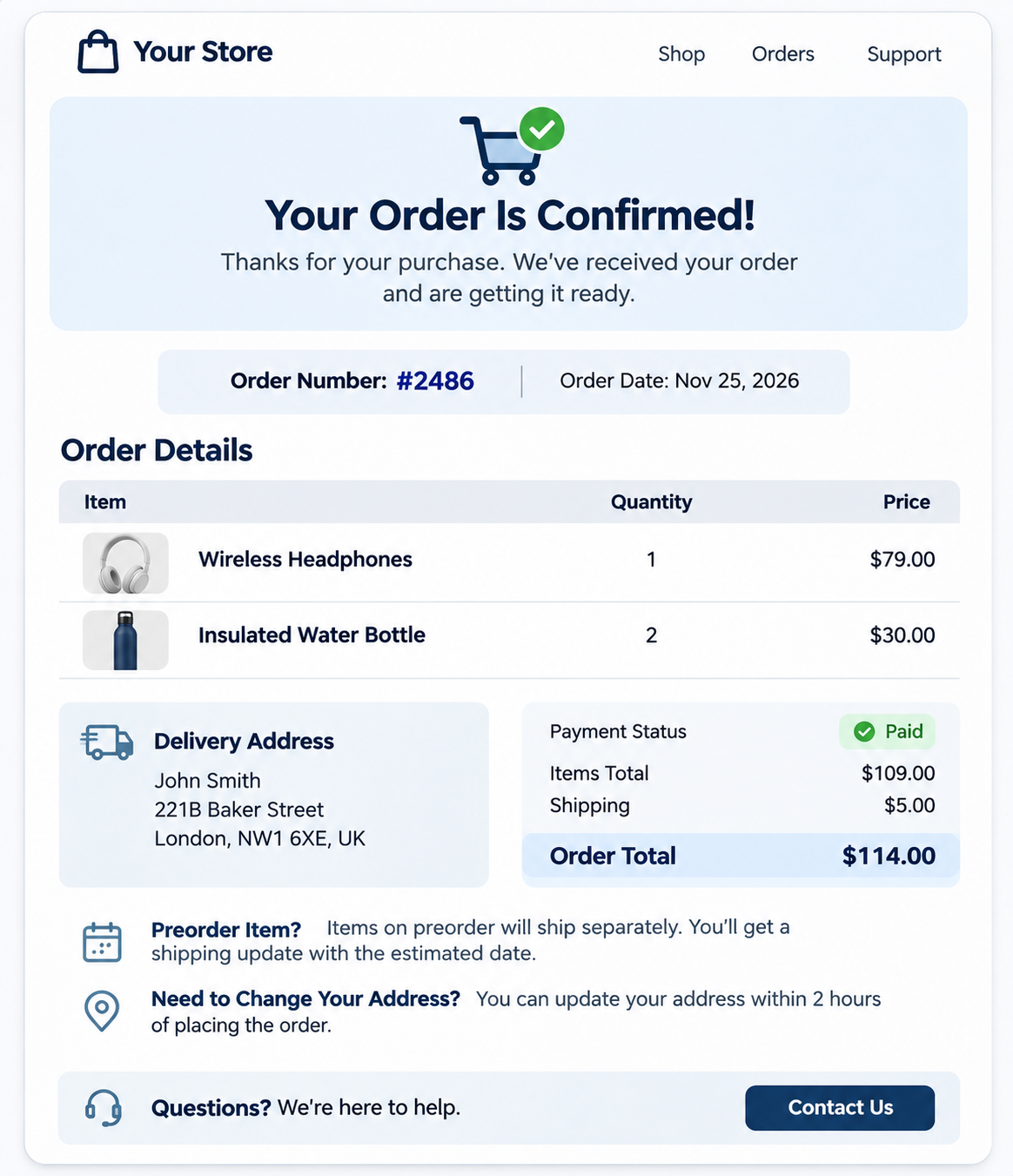
Send an ecommerce order confirmation email as soon as your store accepts the order and verifies the details.
Show the order number, items, quantities, total, and payment status so customers can check what they agreed to buy. Include the delivery address and any separate shipping dates for items on preorder.
If customers can change their address, tell them how to do it and when it’s too late. Give them a way to contact you if they spot a mistake they can’t fix themselves.
Example subject: Your Order #2486 Is Confirmed
2. Payment Confirmation or Payment Issue Email
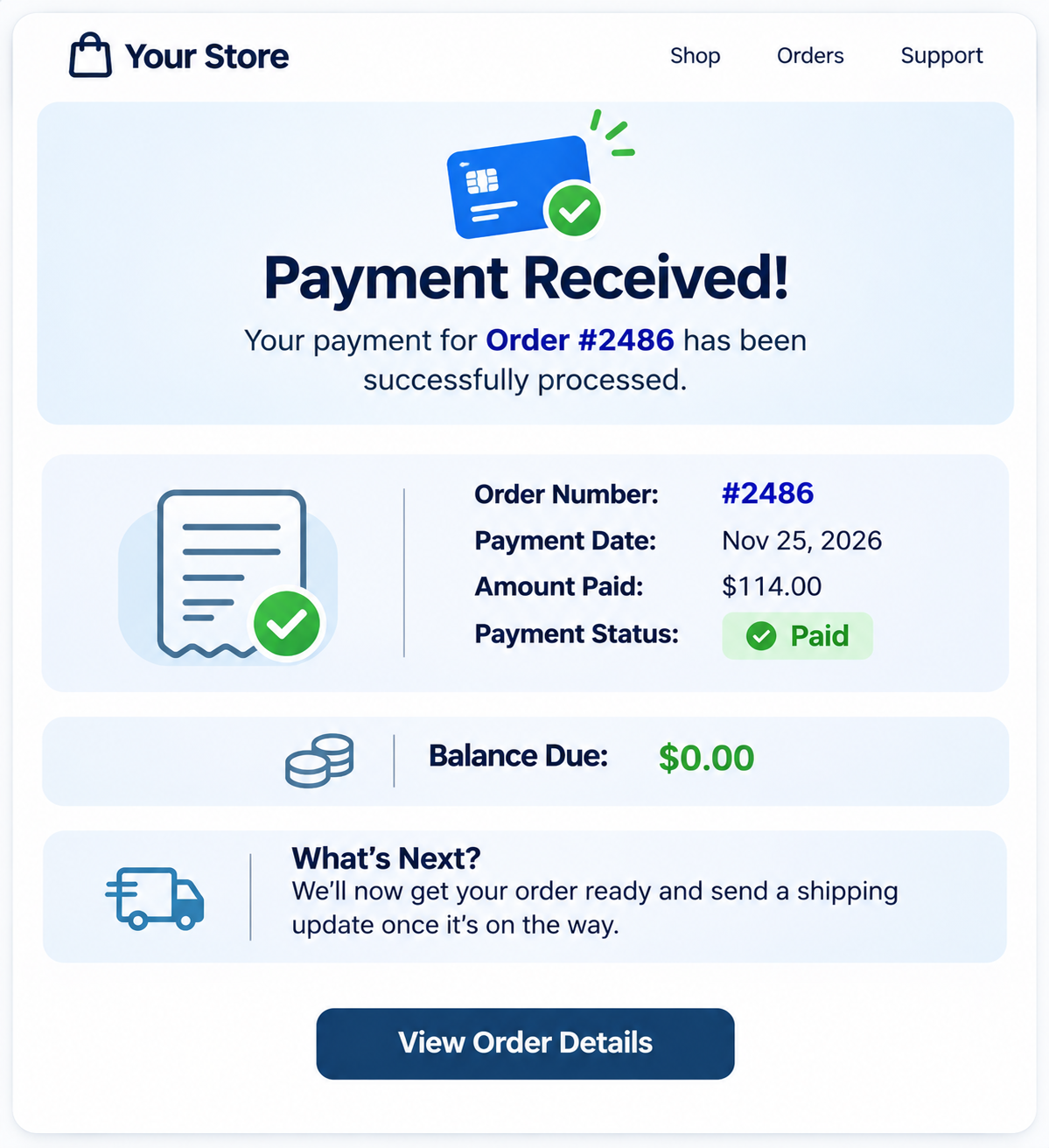
Send an update when the payment status is updated after the order is confirmed, for example when the deposit is cleared.
If payment is outstanding, let the customer know if you are holding the items and when you will call them back again. If it doesn't work, ensure that an order is still pending and provide a secure method to reattempt the transaction.
Upon confirmation of the charge by your payment provider, detail the order number, payment date, payment amount, and any outstanding balance.
Example subject: Payment Received for Order #2486
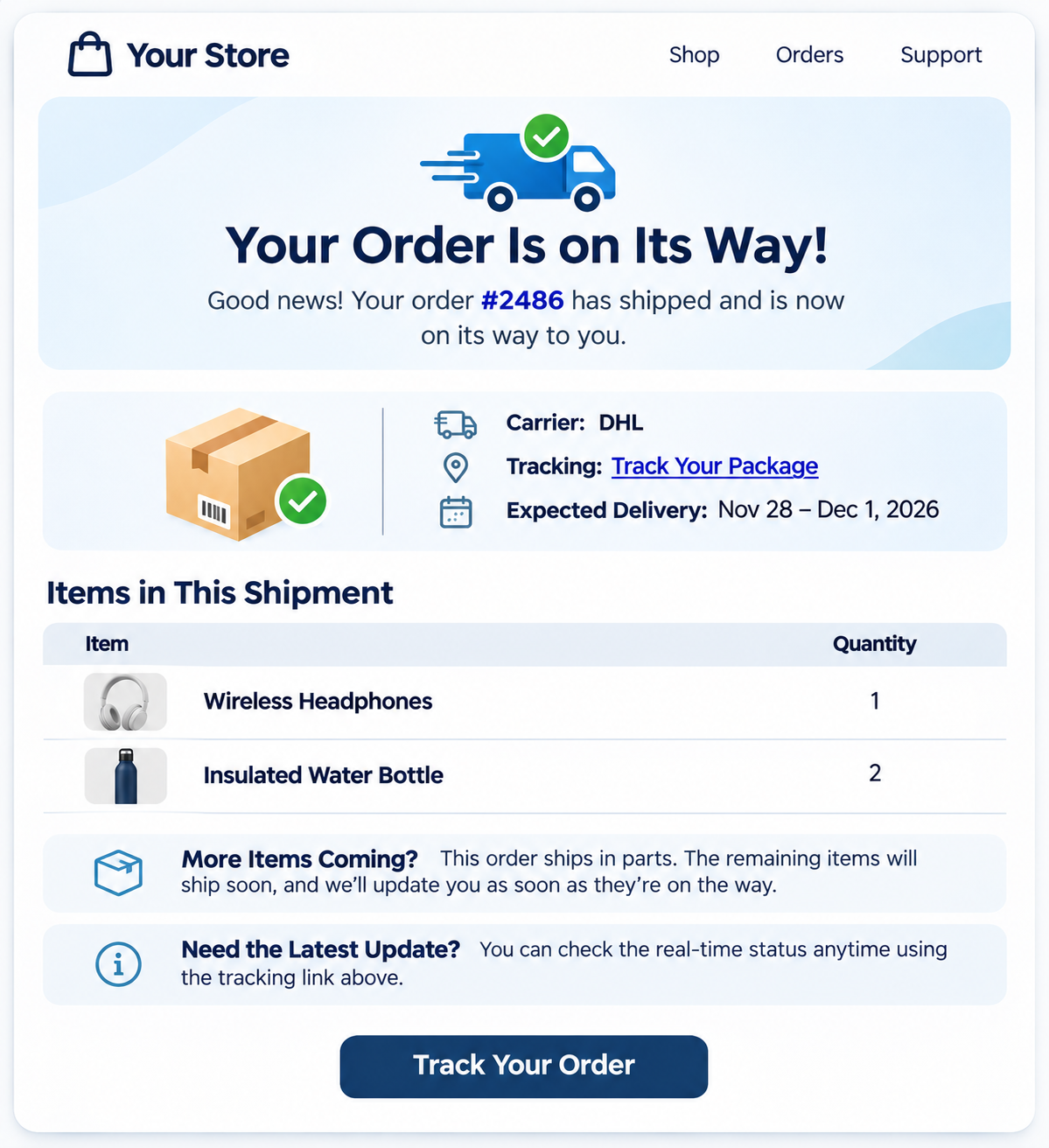
3. Shipping Confirmation Email
Send the email when the carrier collects the parcel or confirms it’s moving. A shipping label can be ready hours before pickup, so check which update your warehouse sends when the parcel leaves.
Include the carrier name, tracking link, expected delivery dates, and the items packed in that parcel. If the order ships in parts, tell the customer which items are still to come.
If you don’t have a reliable delivery estimate yet, show customers where they can check for the latest update.
Example subject: Your Order #2486 Is on Its Way
4. Shipping Delay or Delivery Exception Email
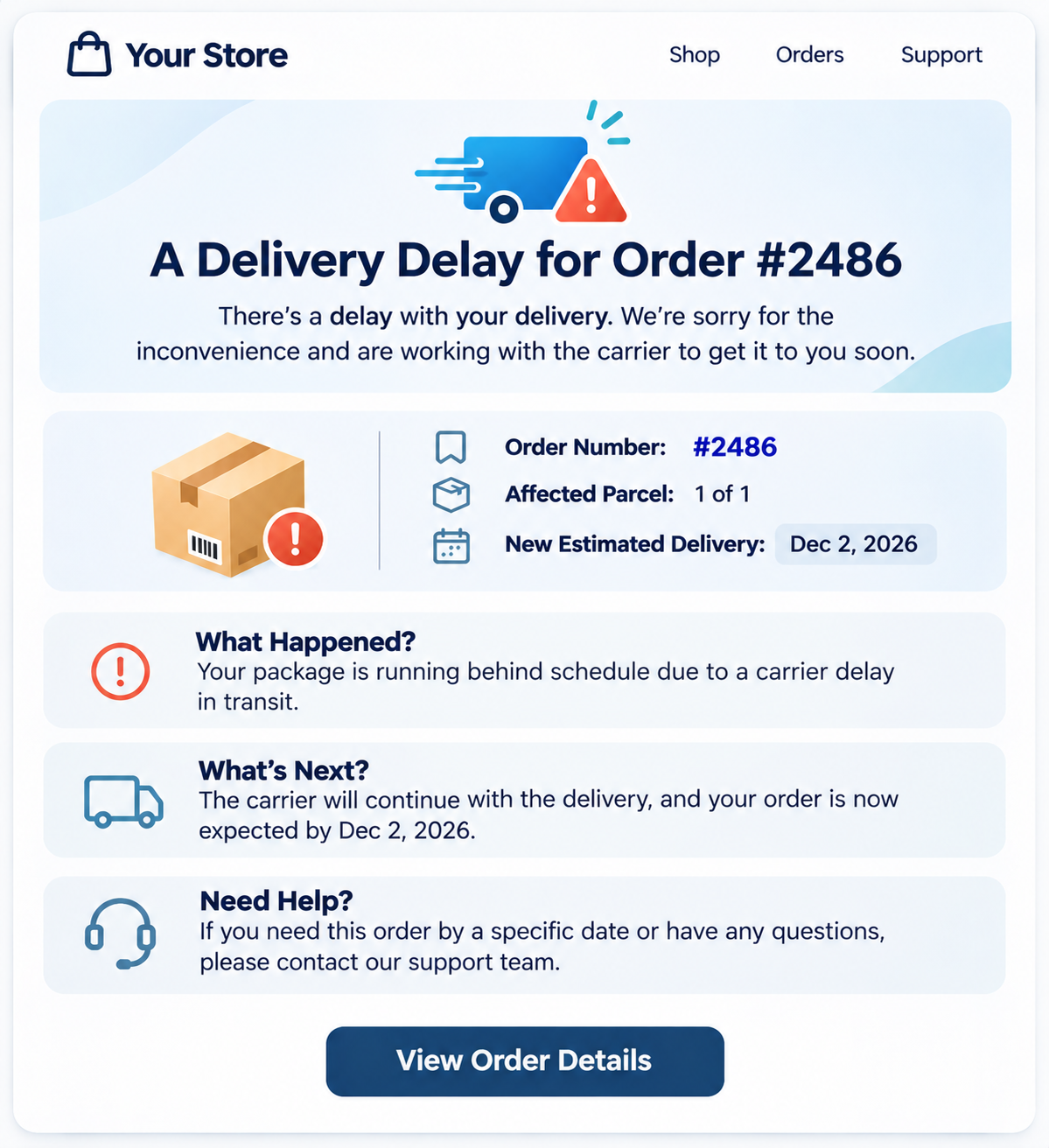
Email the customer as soon as you can confirm a delay or a missed delivery attempt. Tell them what happened, which parcel is affected, and when it’s now expected to arrive.
If you don’t have a new delivery date, tell the customer when they’ll next hear from you. Choose a time your team can keep, even if the carrier is still looking into the delay.
After a missed delivery, explain whether the carrier will try again or the customer needs to book redelivery. Include any booking deadline and a way to get help if the parcel is needed by a certain date.
Example subject: A Delivery Delay for Order #2486
5. Delivery Confirmation Email
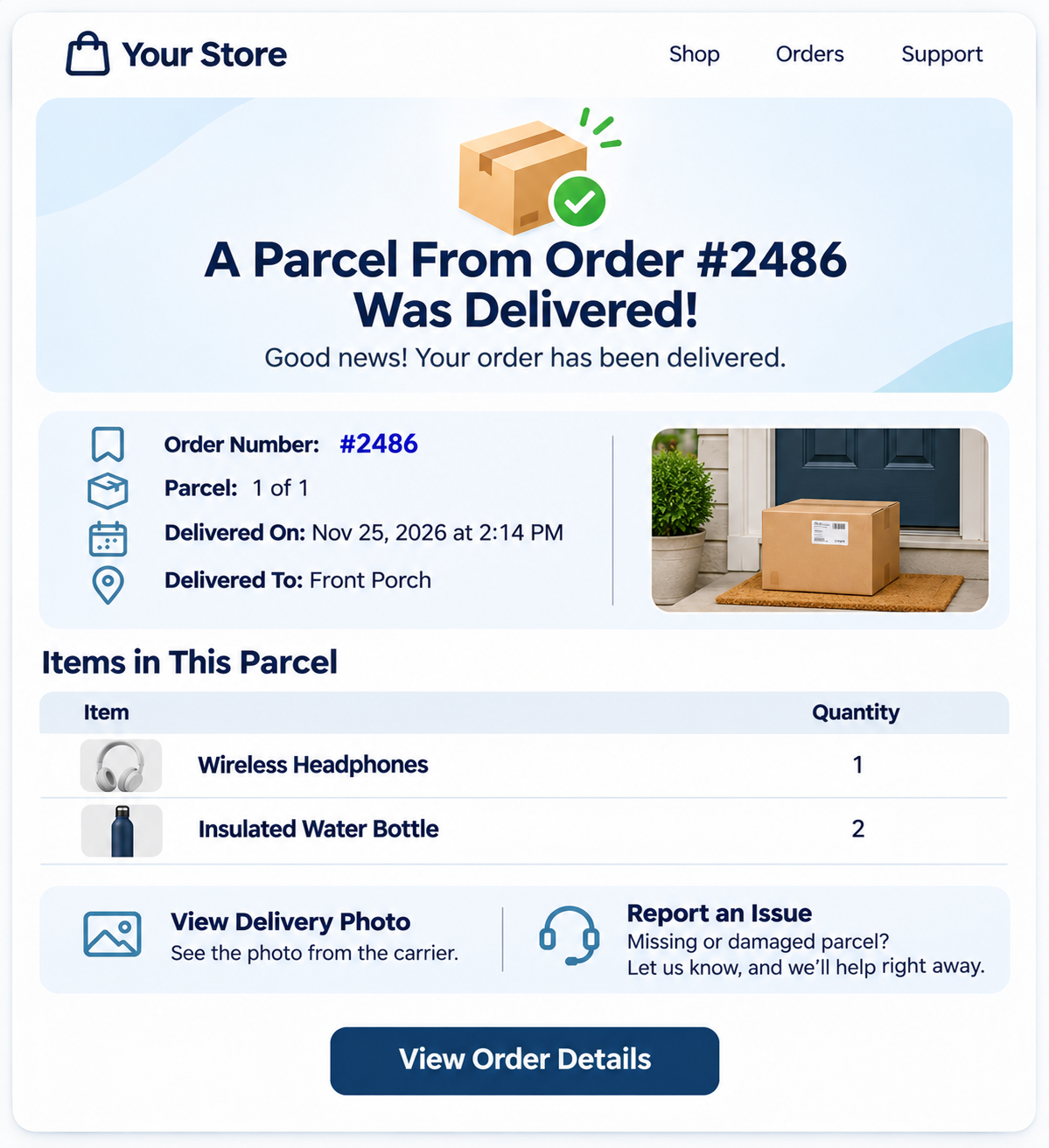
Send this email when the carrier marks the parcel as delivered. Share the recorded time and location when available, such as a front porch, reception desk, or pickup locker.
If an order ships in several parcels, name the items in the one that arrived. Give customers an easy way to view a delivery photo or report a missing or damaged parcel.
For collection orders, send a message when the items are ready. Include the pickup address, opening hours, and any order reference the customer needs to bring.
Example subject: A Parcel From Order #2486 Was Delivered
6. Return and Refund Confirmation Email
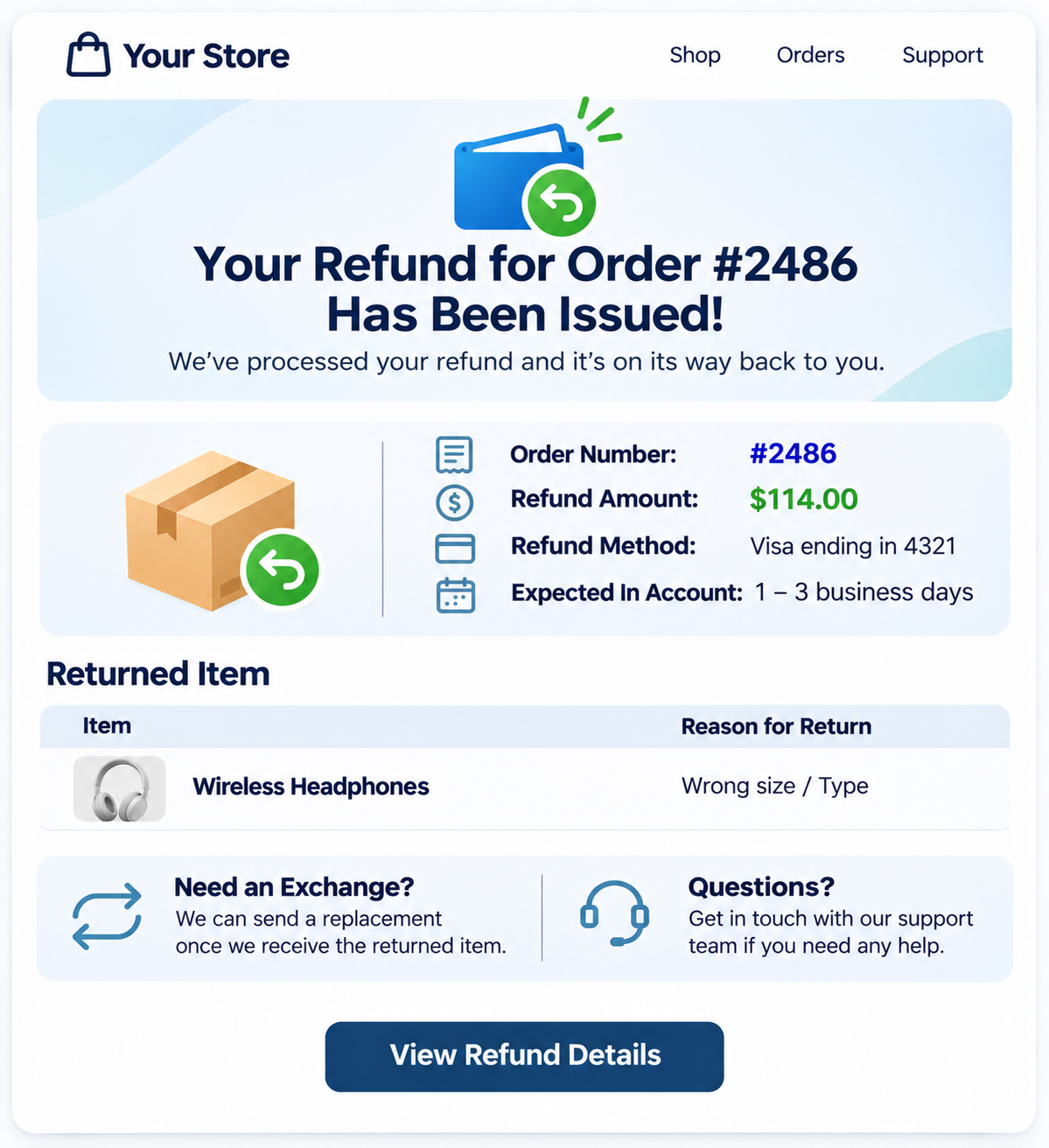
If you receive a return and issue the refund on different days, send an update at each step. Tell the customer what you’ve received and when they can expect to hear from you again.
Once you’ve issued the refund, show the amount, where it went, and when it should appear. If you refunded part to a gift card and part to a debit card, show both amounts.
For an exchange, confirm the replacement item or size and explain when it will ship. If you need the original item back first, say so in the return instructions.
Example subject: Your Refund for Order #2486 Has Been Issued
What Should Every Ecommerce Transactional Email Include?
These transactional email help customers find the relevant update quickly, even when they open emails between tasks. Put the order status and the action someone can take near the top, where they are easy to spot.
- Clear Subject: Name the event and include the order number so customers can find the right update in a crowded inbox.
- Recognizable Sender: Use your store name and a consistent sending address that customers can recognize from their previous messages.
- Order Details: Pull current details from the order record, and select the items, totals, or payment status that matter here.
- Delivery Information: Show tracking details when available and explain whether the arrival window is an estimate or a booked slot.
- Support Access: Link to a monitored contact route and tell the customer what information they need to share with your team.
- Mobile Design: Use readable text, short blocks, and a button customers can tap easily while holding a phone in one hand.
Use the same logo and colors as your checkout, and keep order details readable even if images don’t load. Use the inbox preview for the main update, such as a new delivery date, and give customers one clear action. Before sending, check on a phone that long product names, quantities, and buttons are easy to read and use.
How to Automate Transactional Emails for Your Ecommerce Store
Automated transactional emails send order updates without asking your team to write each message by hand. For each email, decide when it should go out, what customers need to know, and which tool will send it.
Start With Your Ecommerce Platform
To view and modify customer emails and templates, go to Settings → Notifications. Verify the items received by customers when they place orders or when the items are sent in multiple packages.
In WooCommerce, check the currently enabled order e-mails and the conditions under which they are sent. If there are any payment, shipping or returns plugins, look for updates to them too.
If emails are already sent at the correct time, check the clarity of wording first and then look for missing support links. If shipping notices are sent out too early, contact your warehouse staff to find out what condition would mean that the carrier has picked up the parcel.
Connect the Right Email Tools and Triggers
Before switching tools, check which order updates your store can share and what your plan supports. Compare ecommerce email marketing platforms based on the order details they receive and the emails they can send.
Set each email to go out when the order status changes, such as when you issue a refund. For shipping updates, use carrier pickup so customers hear from you once their parcel is on its way.
Write down which tool sends each message and who can check it if the email fails to go out. Before switching, check whether you can turn off the original notification so customers receive one copy.
Test Every Email Before Customers Receive It
Place a test order and follow it through payment, shipping, delivery, and a refund using your store’s usual tools. If you regularly handle guest orders, split shipments, or partial refunds, include those in your tests.
Open each email on a phone and check that the items, prices, dates, and links match the order. Test what customers see when tracking details are missing, and make sure each parcel gets the correct link.
Check that the same order update doesn’t send two emails, and look at the sending log if one is missing. Show your support team how to check whether an email went out and resend it after verifying the order details.
How Transactional Emails Can Support Repeat Purchases
A customer who can track an order, get help, and resolve a return knows what buying from you feels like. That experience gives future campaigns a better starting point, particularly when buyers can remember what they liked about your service.
Map post-purchase email automation around what the customer has actually received and which orders still need attention from your team. For a split shipment, wait until the relevant item arrives before sending a message about using it or reviewing it.
Continue the Conversation With Post-Purchase Email Marketing
After delivery, separate campaigns can help eligible customers get more value from what they bought or find something compatible. Build each follow-up around a reason it matters to that customer, then check the timing against order and support data.
- Product Education: Send useful setup or care instructions when the buyer has the item and can put the advice into practice.
- Review Requests: Ask for honest feedback after buyers have had time to use the product, accounting for delays and returns.
- Product Recommendations: Suggest accessories that fit the exact model purchased, and exclude anything the buyer already ordered with their product.
- Replenishment Reminders: Base refill timing on pack size and likely usage, so customers hear from you around the time they run low.
- Customer Retention: Tailor the next message to purchase history and leave enough time for the customer to benefit from their order.
When you set up ecommerce email marketing automation, send offers only to customers who can receive them. Pause follow-ups while a delivery or return issue is open, and reset refill reminders when someone buys again. Track repeat orders and unsubscribes, and use our guide to six key email marketing flows for ecommerce to plan what to send next.
Improve Your Post-Purchase Email Experience With IR Solutions
If customers get two tracking emails or a review request before delivery, start with one affected order. Check what happened in your store and warehouse, then compare it with the emails your customer received.
IR Solutions can help you find why emails arrive early, go out twice, or fail to reach customers. If a shipping notice goes out when a label is printed, we can help you set it to send after pickup.
We can also make your emails easier to read and set up follow-ups based on what customers bought. Each message can be tested with a sample order before it goes live.
Bring a few examples from your support inbox so we can see where customers are getting stuck. Explore our email marketing services to find out what we can help you fix.
Conclusion
Customers should not have to wonder what happens after placing an order. The clear confirmation, timely shipping updates, and honest delivery notices keep them informed about the purchases. Ensure that each email contains information consumers require and provides an easy method for your team to reach out to them should something go wrong.
Start by checking the emails your store already sends. Correct missing information, unclear communications or updates that are too early. After the basics are running properly, include helpful follow-up e-mails after delivery. A few updates and helpful product tips can help improve the buying experience and make customers want to return to your store.
Frequently Asked Questions
What is an example of a transactional email?
An Order Confirmation is an email that your store sends after a user has placed an order. It displays the Order Number, Order Item and the Order Total to allow them to verify the details.
Are transactional emails the same as marketing emails?
Transactional emails are used to inform customers about an order placed, e.g., when it is shipped. Marketing emails are used to advertise products or offers, for example, a discount on the next purchase.
Do customers need to subscribe to receive transactional emails?
Customers can receive essential updates about their order even if they skip the newsletter signup at checkout. That means their receipt, their tracking information and any updates regarding a return or refund they requested.
Why are my ecommerce order confirmation emails not being delivered?
Check the order record and sending log to see whether the email went out or bounced. If it went out, confirm the customer’s email address and ask them to check their spam folder.
Can I add discount offers to transactional emails?
Do not include receipts or delivery details in a marketing email, and only include details of the order in the receipts and delivery confirmation. This allows customers to easily locate order information and it enables you to send offers to the right customers.