


Key Takeaways
- Offer a furniture sizing guide to turn interested website visitors into email subscribers.
- Use room photos and exact measurements to help customers decide what fits.
- Restore the exact cart configuration and clarify freight costs before offering a discount.
- Send restock alerts only when the requested size or finish becomes available.
- After delivery, share care instructions and recommend pieces that fit the original purchase.
- Use a holdout group to measure added sales, then account for freight and returns.
A customer finds a sofa through a Google ad, chooses an oatmeal fabric, and adds it to their cart. Before placing the order, they measure their living room and wonder if the extended seat will block the doorway. They also want to compare dimensions, delivery costs, and available options before making a decision.
This is where email marketing becomes useful for furniture stores. Instead of losing contact with interested customers, you can send emails that address their concerns and help them move closer to a purchase. An abandoned cart email could remind them about the sofa, while a product recommendation could suggest a smaller design that better fits their space. You can also share fabric care tips, delivery details, and customer reviews to build confidence.
These emails matter because unexpected costs and delivery concerns are common reasons customers abandon their carts. A helpful email can address some of these concerns before customers choose another store.
This guide covers practical email marketing strategies, useful automated campaigns, and ways to measure their impact on sales and revenue.
Why Email Marketing Matters for Online Furniture Stores
Email marketing for online furniture stores helps customers compare products and find answers while they decide what to buy. A dining table comparison gives them something to share at home while they check dimensions, finishes, and delivery dates. If the table and chairs ship separately, explaining that early can help customers decide whether to order them together.
When someone signs up after clicking a paid ad, you can follow up without paying to reach them again. Track first orders by signup source to see which ads bring in customers who go on to buy. Use past orders to guide your furniture ecommerce marketing by recommending pieces that fit, such as storage beneath a desk.
10 Email Strategies for Online Furniture Stores
Good furniture store email marketing starts with the next decision your shopper needs to make about a specific product. Use these ten strategies to choose which decisions your emails can help with before and after an order.
1. Turn Website Visitors Into Subscribers
Offer something useful on the page where a customer is already making a decision, such as a sectional sizing guide. Keep the form short and explain what subscribers will receive before they sign up. Track which forms lead to orders with our guide to building an ecommerce email list.
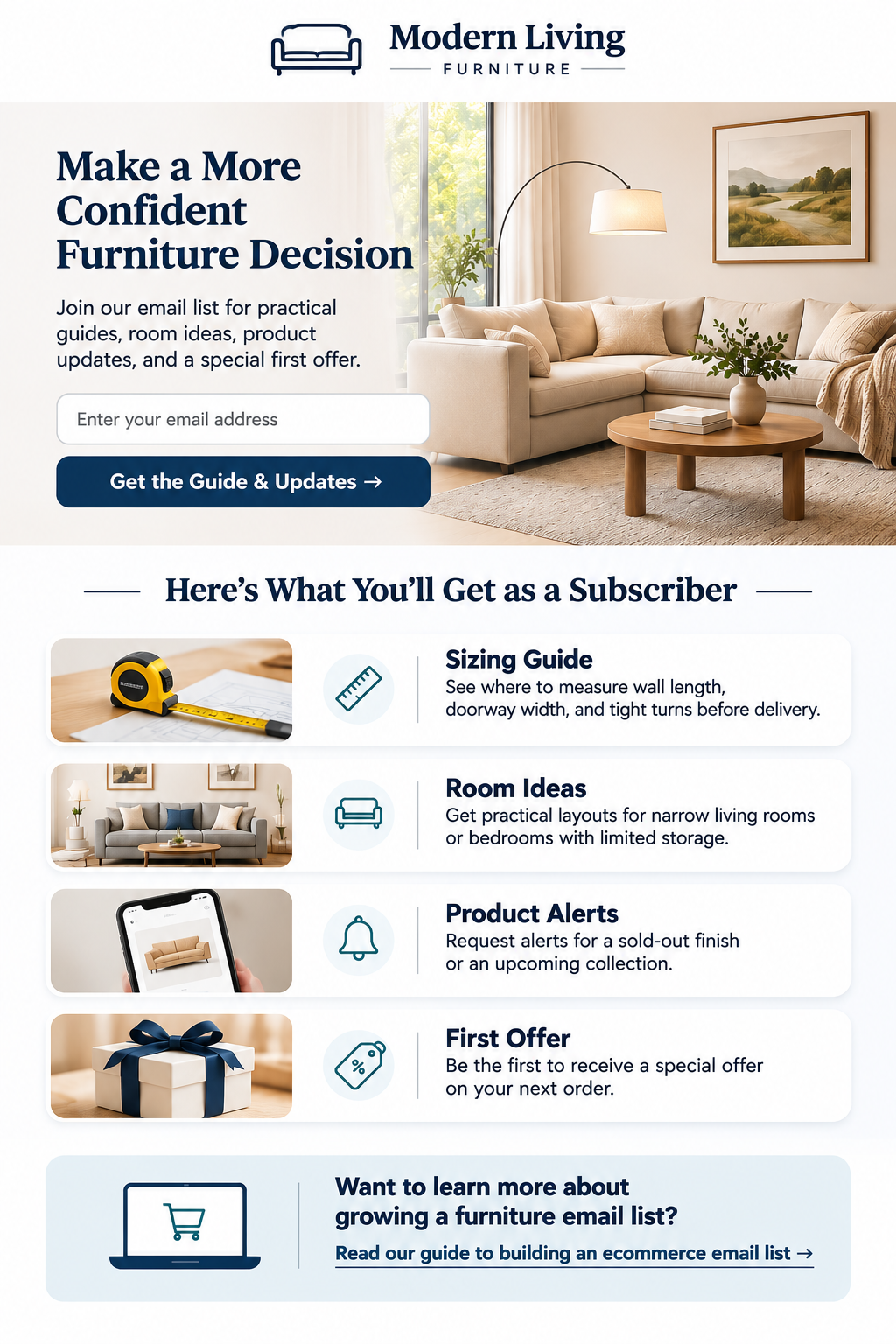
- Sizing guide: Show where to measure wall length, doorway width, and tight turns before delivery.
- Room ideas: Share practical layouts for narrow living rooms or bedrooms with limited storage.
- Product alerts: Let customers request alerts for a sold-out finish or an upcoming collection.
- First offer: Check whether your margin covers the discount and freight before offering it.
2. Personalize Emails by Shopping Interest
Start with the room or material customers choose, then use recent browsing and purchase history when you have permission.
Repeated sofa visits or a swatch request can justify a comparison of seat depths and fabrics. If someone only signed up for general updates, let them choose which rooms interest them in your welcome email.
3. Show Furniture in a Complete Room
Show the sofa with a rug and coffee table, leaving enough of the room visible to judge the walking space. Put the dimensions below the photo and link directly to the sofa and any accessories customers can order.
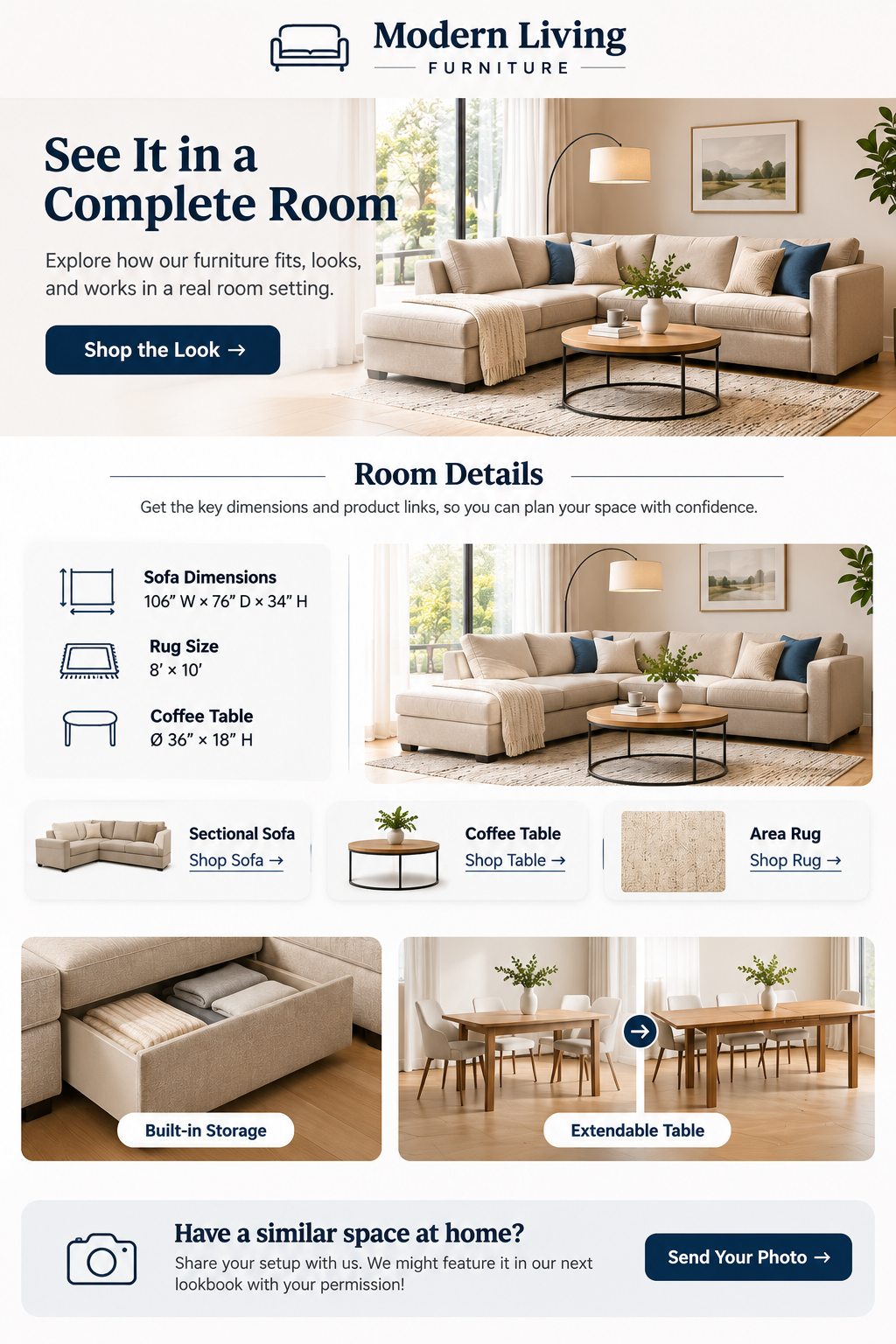
Show storage drawers open or photograph an extendable table in both positions to make the space requirements clear. If you use a customer’s room photo, get permission and confirm the finish before linking to the product.
4. Use 3D Views and Product Videos
Use a short GIF to show a sleeper sofa opening or a dining table extending. Make the first frame useful on its own, since some email apps may display it as a still image.
Link to the product page for 360-degree views and layout tools, where customers can explore the exact configuration. Cylindo’s furniture examples show how Cozey uses product renders and animated images to present different configurations.
5. Answer Buying Questions Before Checkout
Turn questions your support team answers regularly into short buying guides for the products customers are already comparing.
Send the guide that matches the category they viewed, and link to the relevant measurements or care instructions.
- Sofa fit: Show how to measure doorways, stair landings, and tight turns before delivery.
- Wood types: Identify solid wood, veneer, and engineered wood parts, and explain how each is cleaned.
- Fabric care: Explain which covers are removable, how to wash them, and where to request swatches.
- Mattress choice: Compare mattress materials, firmness descriptions, and trial terms before customers narrow their options.
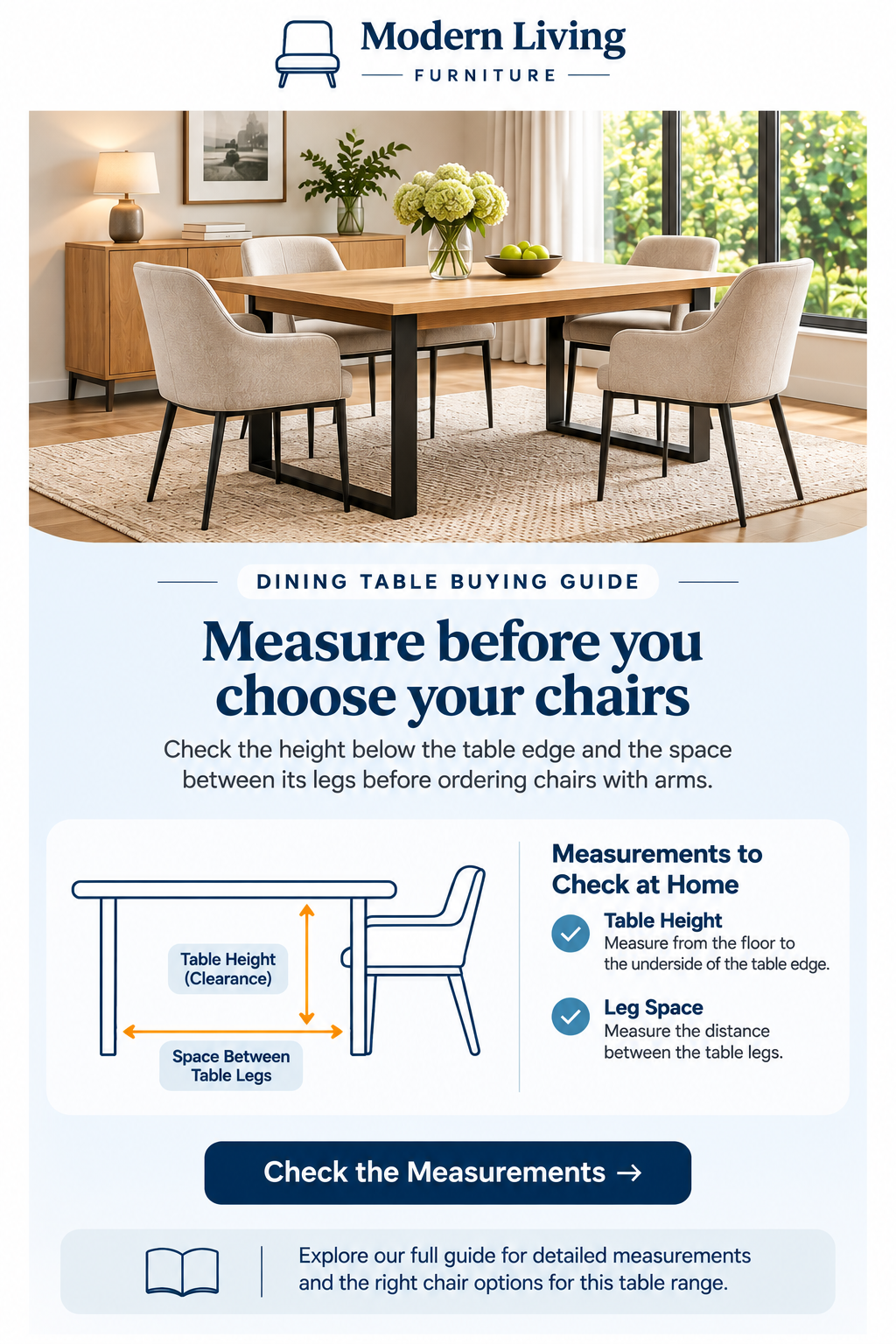
- Table seating: Show how many chairs fit between the legs with the table extended.
6. Recover Abandoned Furniture Carts
Furniture abandoned cart emails should show the exact size, finish, and layout the customer selected. Test that the return button restores those choices on another device.
Use the follow-up to answer a common fit or delivery question before testing a discount. Our abandoned cart email timing guide can help you decide when to send each message.
- Delivery details: Show estimated freight charges and explain what room delivery or assembly includes.
- Return terms: Link to the item’s return policy and flag freight charges or custom-order restrictions.
- Buyer reviews: Choose a genuine review that answers a question about assembly, comfort, or finish.
- Direct help: Use a monitored reply address so customers can ask about fit or delivery.
7. Send Restock and Price Drop Alerts
Send restock alerts for the exact finish or size requested, and state whether it ships now or is available for preorder. If stock is limited, send alerts in batches that reflect the number of units available.
For price drops, set a minimum reduction and make sure the email matches the current product page. Check Klaviyo’s price drop documentation for integration and eligibility details.
8. Launch Collections to Interested Customers
Plan furniture store email campaigns around what customers have been browsing. For a patio collection, show how much floor space the set needs and where the cushions can be stored.
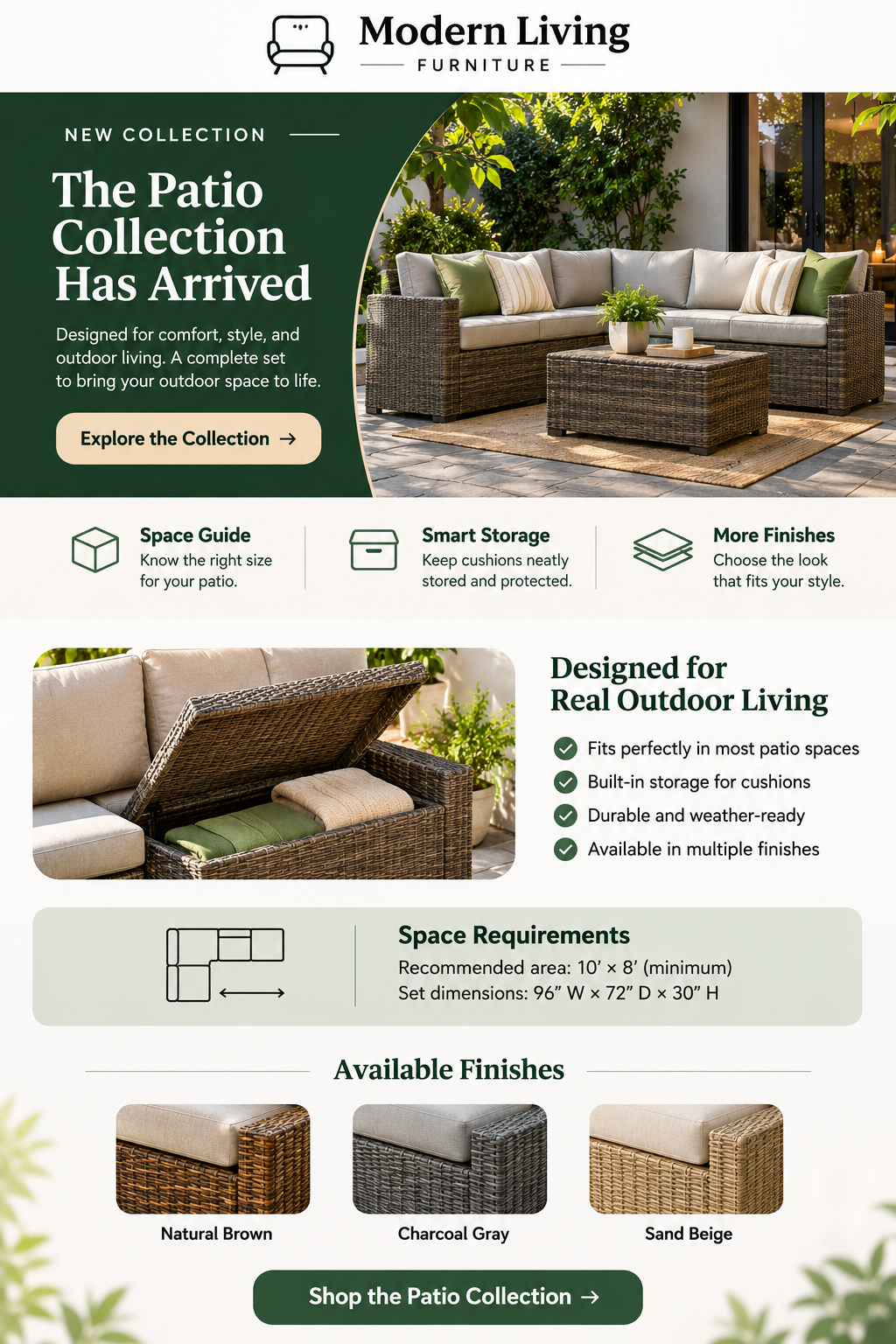
Send the launch to people who requested a preview or recently browsed the category. Check stock and delivery regions before sending, and follow up when there’s something new to share, such as another finish.
9. Recommend Pieces That Fit Together
The most useful furniture email marketing ideas start with pieces customers already want. If someone is considering a dining table, show which chairs slide underneath without their arms catching on the frame.
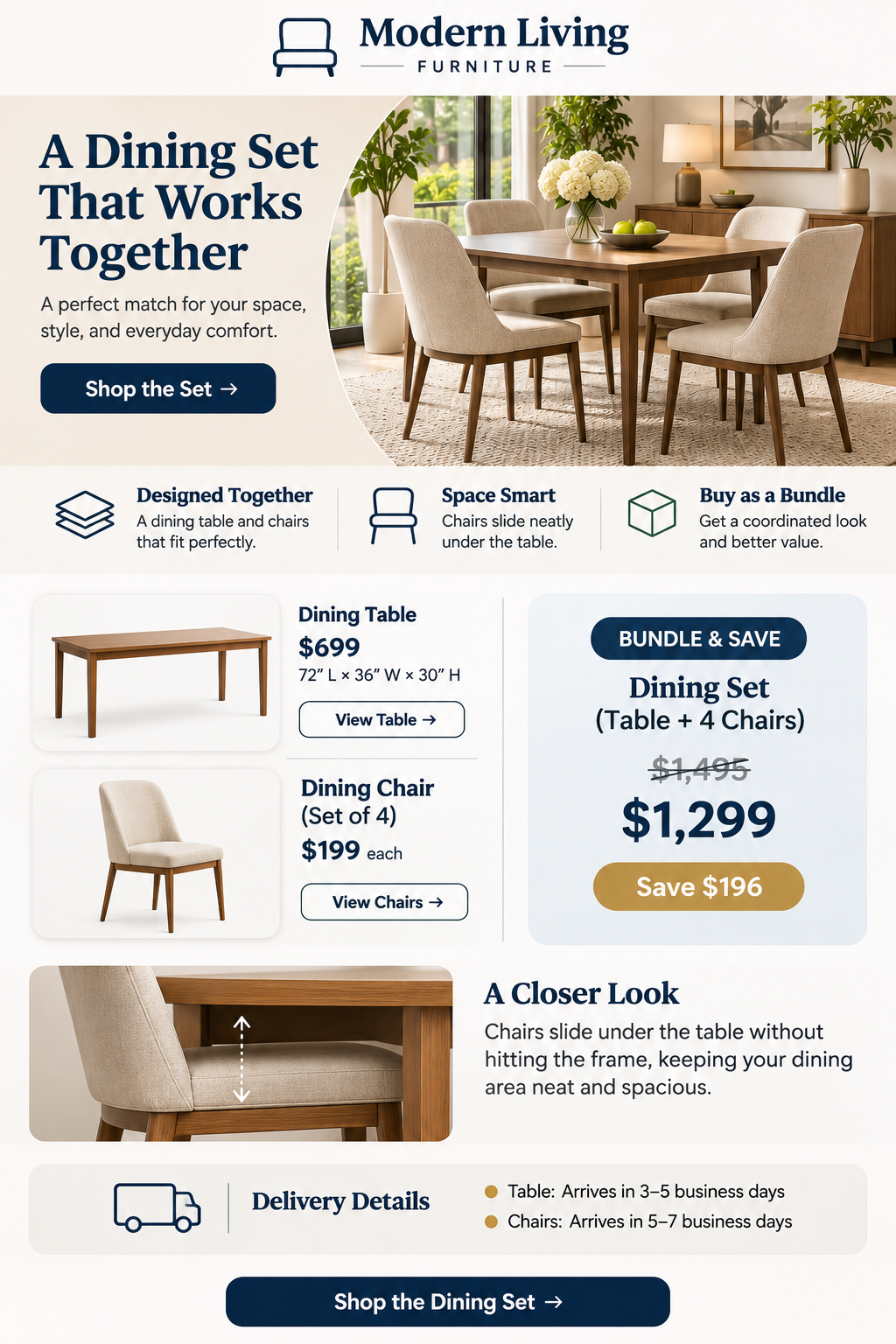 Show individual and bundle prices, and explain when each piece will arrive if they ship separately. Check whether the bundle earns more after freight and returns before featuring it in another campaign.
10. Build Repeat Sales After Delivery
Furniture store customer retention starts with helping buyers assemble and care for what they ordered.
Use the delivery date to time your follow-up, and pause promotional emails while support handles damage or missing parts.
- Care guide: Send cleaning instructions for the exact fabric, wood finish, or material the customer chose.
- Room styling: Suggest a rug, lighting, or storage that works with the piece they bought.
- Buyer feedback: Ask for feedback after customers have had time to use the furniture.
- Return visit: Share compatible additions, such as nightstands that match a bed the customer bought.
Essential Email Automation for Furniture Ecommerce
Furniture email marketing automation works when the store can tell what a shopper did and which message should come next. Each flow needs an entry rule, a reason to send, and a condition that removes shoppers who have moved on. This guide to ecommerce email flows explains the basic setup before you build the rules for your own catalog.
Automation | Trigger | Email focus |
Welcome series | Eligible marketing signup | Promised guide, store introduction, relevant products |
Browse abandonment | Eligible known subscriber views a product | Product detail or a useful comparison |
Cart recovery | Eligible shopper leaves items in a cart | Saved variant, purchase questions, return to cart |
Checkout abandonment | Eligible shopper starts checkout without ordering | Delivery information and a route back to checkout |
Back-in-stock | Requested variant becomes available | Exact product, finish, and availability |
Price drop | Eligible product or variant falls in price | Updated price and relevant terms |
Post-purchase | Order placed or delivery recorded | Order updates, setup, care, and relevant follow-up |
Win-back | Eligible customer exceeds a suitable inactivity period | New products related to past interests |
Decide Which Flow Gets Priority
Stop browse reminders when a customer adds an item to their cart, then switch to checkout recovery once checkout starts. Before each reminder goes out, check whether the customer has ordered and cancel any remaining reminders if they have. Keep order and delivery updates on a separate schedule so campaign limits don’t delay information customers need.
Test the Journey With Realistic Orders
Test new signups, returning buyers, and opt-outs using carts that contain both in-stock and made-to-order furniture. Place a test order while a reminder is queued and confirm that it cancels any remaining recovery emails. Check what happens when a product image, price, or selected finish is missing, and skip sends that could mislead customers.
Furniture Email Campaign Ideas With Examples
These furniture email marketing examples show how one product image, one useful detail, and one main button can work together. Adapt these samples to your inventory, delivery terms, and the questions shoppers have about the products you plan to feature.
Campaign | Subject line | Main button |
Room makeover | One sofa, two living room layouts | Compare the layouts |
Fabric comparison | Which sofa fabric suits your home? | Compare the fabrics |
New arrivals | Meet our new modular sofas | Explore modular sofas |
Small spaces | A dining table that folds away | See it open and folded |
Cart recovery | Still deciding on your sectional? | Return to your cart |
Buying guide | Will those chairs fit under your table? | Check the measurements |
Bedroom bundle | A bed and nightstands that line up | See the bedroom set |
Seasonal collection | Set up your patio for outdoor dining | Explore outdoor furniture |
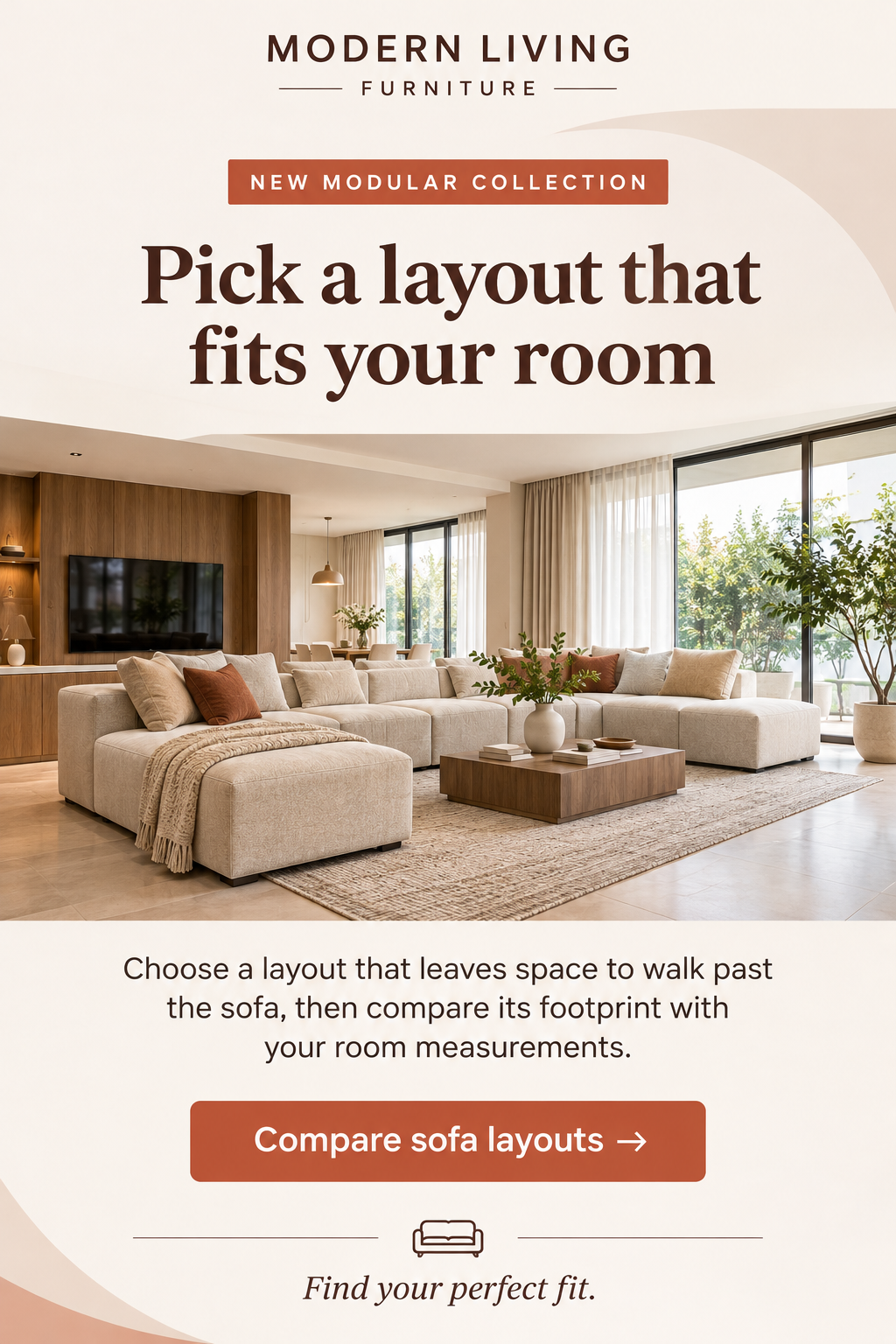
Sample Layout 1 — Modular Sofa Launch
Sample Layout 2 — Dining Table Buying Guide
Match the Button to the Landing Page
Before sending, tap the email’s main button on your phone while signed out to see what customers will see. If the button says “Compare Sofa Layouts,” show the layouts first, with links to the products featured in each one. After a launch, check the page again and update any sold-out item with its stock status and the closest available option.
How Often Should Furniture Stores Send Marketing Emails?
Start with one campaign per week, then adjust how often each group hears from you based on recent activity. During a collection launch, send extra updates to subscribers who requested a preview or recently browsed that category. Before sending, check whether those same subscribers are already due to receive a welcome email or cart reminder.
Week | Campaign | Suggested audience |
1 | New furniture collection | Subscribers interested in the featured category |
2 | Room styling inspiration | Readers of the relevant room guide |
3 | Material comparison or buying guide | Shoppers comparing products in that category |
4 | Seasonal offer or complementary collection | Eligible seasonal shoppers or owners of matching pieces |
Adjust Frequency Using Customer Activity
Send more often when subscribers show fresh interest, such as requesting a collection preview or revisiting a product category. Send less often to subscribers who rarely click, and let them choose which collections they want to hear about.
Test an extra weekly email with comparable groups, then give both enough time to complete a furniture purchase. Compare orders, revenue per recipient, and unsubscribes to see whether the extra email is worth keeping. If unsubscribes rise, check how many campaigns and automated emails those subscribers received that week.
How to Measure Furniture Email Marketing Results
Track orders, profit, and unsubscribes to see how customers respond and whether email earns its budget.
Report campaigns and automated flows separately so you can see what each contributes at different buying stages.
- Attributed revenue: Track sales credited to each email and record the attribution window.
- Recipient revenue: Divide attributed revenue by recipients and compare emails sent to similar groups.
- Conversion rate: Divide recipients who placed orders by eligible recipients within the same measurement window.
- Cart recovery: Divide recovered carts by eligible abandoned carts and compare with a holdout group.
- Order value: Divide net revenue by order count and compare bundle and standalone orders.
- Repeat purchases: Compare repeat orders across customer groups with equal time to buy again.
- Unsubscribe rate: Divide unsubscribes by delivered emails and check which sends caused a spike.
- Order profit: Subtract product costs, freight, fees, returns, and email expenses from net sales.
Check How Much Email Actually Adds
Exclude a randomly selected group of eligible subscribers from a marketing email while sending it to the rest. Keep order confirmations and delivery updates running for everyone. Compare order rates and profit across both groups over the same period, accounting for delivery costs and returns. Our ecommerce email A/B testing guide explains how to plan tests and choose what to measure.
How to Start Email Marketing for Your Furniture Store
Start with one furniture category your customers already browse and one buying question your team can answer well. Use the steps below to collect signups, send your first emails, and see which messages lead to orders.
Step | What to do |
1. Connect your store | Choose an email platform that syncs product variants, cart activity, and orders from your storefront. |
2. Collect signups | Offer a sizing guide or room planning checklist, and explain what customers will receive. |
3. Group subscribers | Start with broad interests, such as living room or dining furniture, and use recent activity to refine each group. |
4. Build two flows | Set up a welcome email that delivers the signup offer and a cart reminder that restores the selected item. |
5. Send your first campaign | Pick one category and answer a buying question with photos, measurements, and direct product links. |
6. Measure results | Track orders and revenue, then factor in freight and returns to see how much profit remains. |
7. Test one change | Change the send time, main button, or featured product, then compare results before making another change. |
Set Up the First Two Flows
Test both flows on a phone and check that the welcome email delivers the guide promised at signup. Make sure the cart reminder shows the correct finish and price, restores the cart, and stops after an order. If your team needs help, IR Solutions can set up both flows and connect email reporting to your store’s orders.
Conclusion
A furniture purchase often comes down to details customers check at home, such as doorway width or room for chairs. Start with one product category and use your next email to answer the question your team hears most from customers.
Show the measurements beside a room photo, explain delivery costs, or bring customers back to the exact configuration they saved. After delivery, send care instructions for the material they chose, then suggest pieces that fit when they’re ready to buy.
Track orders and profit after freight and returns to see which emails are worth keeping as you build your program. If you’d like help getting started, explore our email marketing services for campaigns and automated emails built around your catalog.
Frequently Asked Questions
Does email marketing work for online furniture stores?
Email marketing for furniture retailers works best when it gives subscribers practical help with purchases they are already considering. An easy first measure is whether readers who receive your buying guide return to the product pages it features.
How can furniture stores increase online sales through email?
Start with a category that gets plenty of visits and has a clear reason shoppers hesitate before placing orders. Send eligible subscribers the information they need to decide, then track orders and costs for that category over time.
What types of emails should furniture brands send?
Use welcome emails to deliver a promised guide, campaigns to introduce relevant collections, and service messages to explain order progress. Add stock alerts or automated product follow-ups when your catalog can supply the detail the customer expects to see.
How can furniture stores reduce abandoned carts?
Show total delivery costs and realistic arrival estimates before checkout so shoppers can weigh both when they build their cart. Review cart replies for patterns, then use the answers to improve the store pages where new shoppers make those decisions.
How often should online furniture stores send emails?
A weekly slot gives a small team time to plan a relevant send, with audience rules limiting who receives it. Review each group’s purchase activity and unsubscribes before increasing the frequency, particularly when subscribers also qualify for automated messages.
Which email marketing platform is best for furniture ecommerce?
Choose a platform that receives accurate product and order events from your store and supports the flows you want. Trial the integration with an exact product variant, a test purchase, and an unsubscribe before moving your existing subscriber list.