


Key Takeaways
- Klaviyo supports both static and unique coupon codes, so you can match each offer to its goal.
- Unique codes give each person their own discount, which cuts down on sharing and coupon site leaks.
- Shopify supports native Klaviyo coupon workflows across campaigns, flows, signup forms, email, and SMS.
- Coupon features differ by ecommerce platform, so check what your own integration supports before you plan.
- Always generate extra codes and test every coupon, because a broken or empty code costs you sales.
- Use discounts on purpose, since sending them to everyone cuts your profit and trains customers to wait.
A coupon can be a great way to turn a first-time visitor into a paying customer. But if the same discount code gets shared everywhere, your offer can quickly reach people who were never meant to use it. A code created for a small email campaign could end up on a coupon website, in a social media post, or in a deal-sharing group. That means more discounts, less profit, and less control over your promotion.
Klaviyo gives ecommerce brands a simple way to avoid this problem with unique coupon codes. Instead of giving everyone the same code, you can create individual codes that are assigned to specific customers. This makes it much harder for one person to share their discount with hundreds of other shoppers.
Klaviyo supports both static and unique coupons, giving you different options depending on the type of promotion you are running. Klaviyo's official coupon documentation explains how these codes can be created, uploaded, and used across supported messaging channels. You can use coupons in emails, flows, SMS, and supported signup forms, making them useful for welcome offers, abandoned carts, special promotions, and customer rewards.
In this guide, we’ll cover how to create, send, manage, and track unique Klaviyo coupon codes. You’ll also learn how to set them up with Shopify, use them across different Klaviyo channels, and fix common coupon issues.
What Are Klaviyo Coupon Codes?
Klaviyo coupon codes are codes you can send to your customers via email, SMS, signup forms, and automated flows. The discount is created in your online store, and Klaviyo delivers the appropriate offer to your customers according to your campaign or automation.
Klaviyo has two types of coupon codes static and unique. A static code is common to all, and a unique code is generated for each customer and can be used just once. Static codes are great for offers you feel confident in distributing to the masses, unique codes for discounts allow you greater control over who can use a discount.
Static Coupon Codes
A static code is one code that everyone uses. You create it in your store platform, like Shopify, and then paste it into your emails or texts. WELCOME10 is a good example. It's easy to remember and quick to type. The problem is that anyone can share it, and one post on a deal site can send it everywhere.
Unique Coupon Codes
A unique code is made for one person and usually works only once. Klaviyo also calls these dynamic codes because it gives every subscriber a fresh one. They're a good fit when the offer is meant for a specific customer or group, and you don't want it passed around.
Static vs Unique Coupons Compared
Here's a quick side-by-side to help you pick for your next promotion.
Feature | Static Coupon | Unique Coupon |
Code | Same for everyone | Different for each person |
Sharing risk | Higher | Lower |
Setup | Simple | Takes more work |
Best for | Big public sales | Targeted offers |
Personalization | Limited | Strong |
Control and tracking | Lower | Better |
Common uses | Sitewide sale | Welcome, win-back, VIP |
Want to reach as many people as possible? Go static. Want tighter control? Go unique.
Why the Choice Matters
Your pick affects your profit, your reports, and how far an offer can spread. Static codes work well for sales where everyone should get the deal, like Black Friday or clearance. Unique codes work better for private moments, like a welcome offer or a "we miss you" email. Most stores use both: static for public sales, unique for emails and texts sent to individuals.
When Should You Use a Unique Klaviyo Coupon?
Many brands hand out discounts without asking whether the offer needs to be public. Unique coupons work best when a discount should feel personal, protected, and tied to a clear business goal. Here are five real ecommerce moments where a single-use code protects your margin and gives customers a reason to act.
Welcome Offers
Offer each new subscriber a personal 1st order discount rather than a public one. This also decreases the possibility of a welcome code being leaked onto coupon sites or deal-sharing communities. Make sure to match the code with an obvious expiration date, which ensures that new subscribers take action when they have great interest.
Abandoned Cart Incentives
Offer a unique discount only to shoppers who need an extra reason to complete the purchase. Plenty of shoppers return on their own, so a blanket cart discount often gives away margin needlessly. Try a reminder first, then use the coupon in a later message only for undecided shoppers.
Our guide on how Klaviyo flows turn abandoned carts into sales shows how to segment these shoppers properly.
Win-Back Campaigns
Inactive customers often need a nudge, and a personal, time-limited offer can bring them back. A unique code with a clear expiry date adds urgency without training your whole list to wait. Review purchase history first, so you only target people who have been inactive for a sensible period.
VIP and High-Value Customer Offers
Your best customers deserve something better than a code posted on your homepage for everyone. Exclusive coupons make early access and pre-sale events feel special, and they keep the offer inside your community. Consider offering an exclusive perk or tailored discount that feels different from your standard promotions. The reward does not necessarily need to be larger if exclusivity, early access, or another benefit makes it valuable.
Customer Service or Delivery Recovery
When a delivery runs late, an individual code works as a quick apology without creating a public discount. A small personal gesture like this can rescue a bad experience and protect the customer relationship. Klaviyo itself lists welcome, abandoned cart, win-back, VIP, and shipping delay scenarios as common uses for unique coupons.
How to Create Unique Coupon Codes in Klaviyo for Shopify
Klaviyo lets Shopify stores create and manage unique coupon codes directly inside the platform. The setup below covers how to create the discount, generate codes for campaigns, use them in messages, and test the offer before sending. Follow the seven steps below to generate single-use Shopify discounts, connect them to your messages, and test them before customers ever see them.
Before You Begin
Good coupon setup starts with a clear business goal, not with a click inside the Klaviyo dashboard.
- Set Goal: Decide whether you want a first purchase, a repeat order, or a noticeably bigger basket size.
- Know Margin: Check how much discount your profit can absorb before you choose a percentage or amount.
- Pick Audience: Decide exactly who receives the offer, because a great coupon sent to everyone rarely stays profitable.
- Choose Channel: Pick email, SMS, or a signup form first, since each channel has slightly different coupon rules.
Step 1: Connect Shopify to Klaviyo
Your Shopify integration must be active before the Coupons area becomes available inside your Klaviyo account.
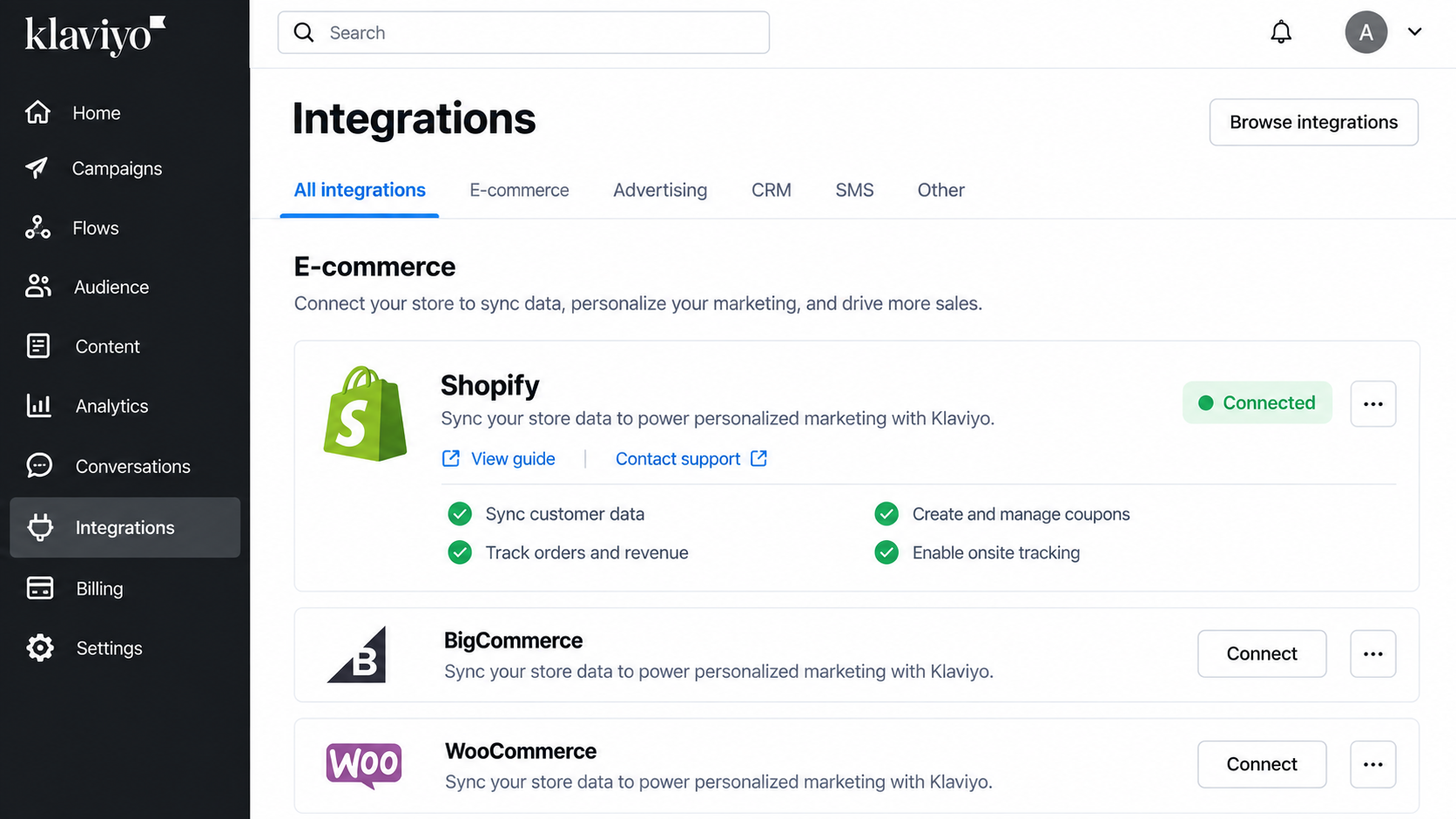
If you have not done this yet, read about connecting Klaviyo with Shopify before moving on.
Step 2: Open the Coupons Section
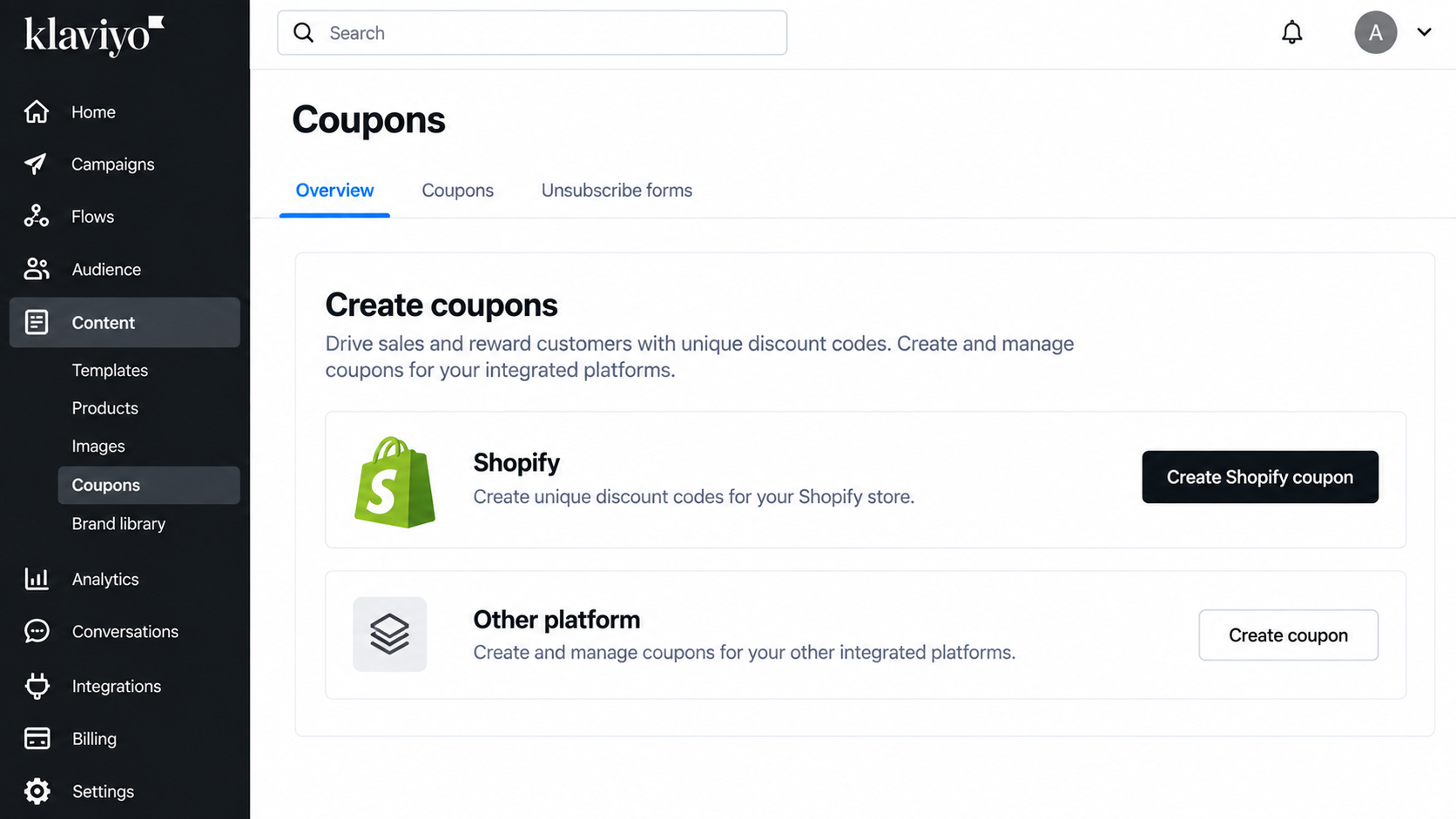
In your Klaviyo account, go to Content, then Coupons, and choose the Shopify coupon creation option.
Step 3: Name Your Coupon and Add a Prefix
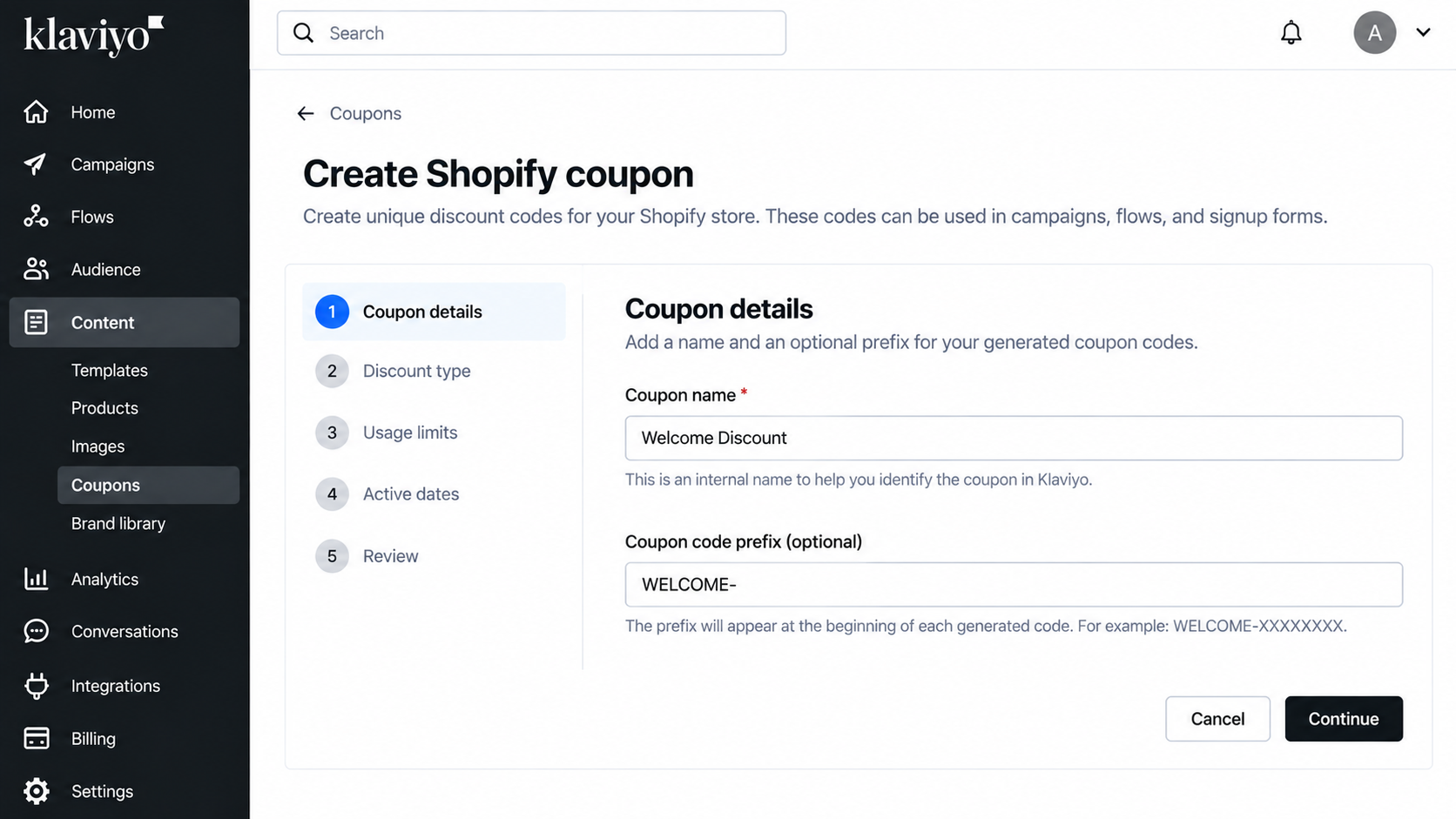
The coupon name is an internal label that you will use later when inserting the coupon into a message. The prefix is optional, but it gives every generated code a recognizable beginning, such as WELCOME-XXXXXXXXXX. Write the name carefully, because you must reference it exactly when you add the coupon to an email.
Step 4: Choose the Discount Type
Klaviyo lets you choose from three main discount types, and each suits a different goal.
- Percentage Discount: Take ten percent off the order, which works well for welcome offers and general promotions.
- Fixed Amount: Give five dollars off an order, which feels simple and clear to shoppers who dislike doing percentage math.
- Free Shipping: Remove delivery costs for the customer, which can be especially useful when shipping costs are a common purchase barrier.
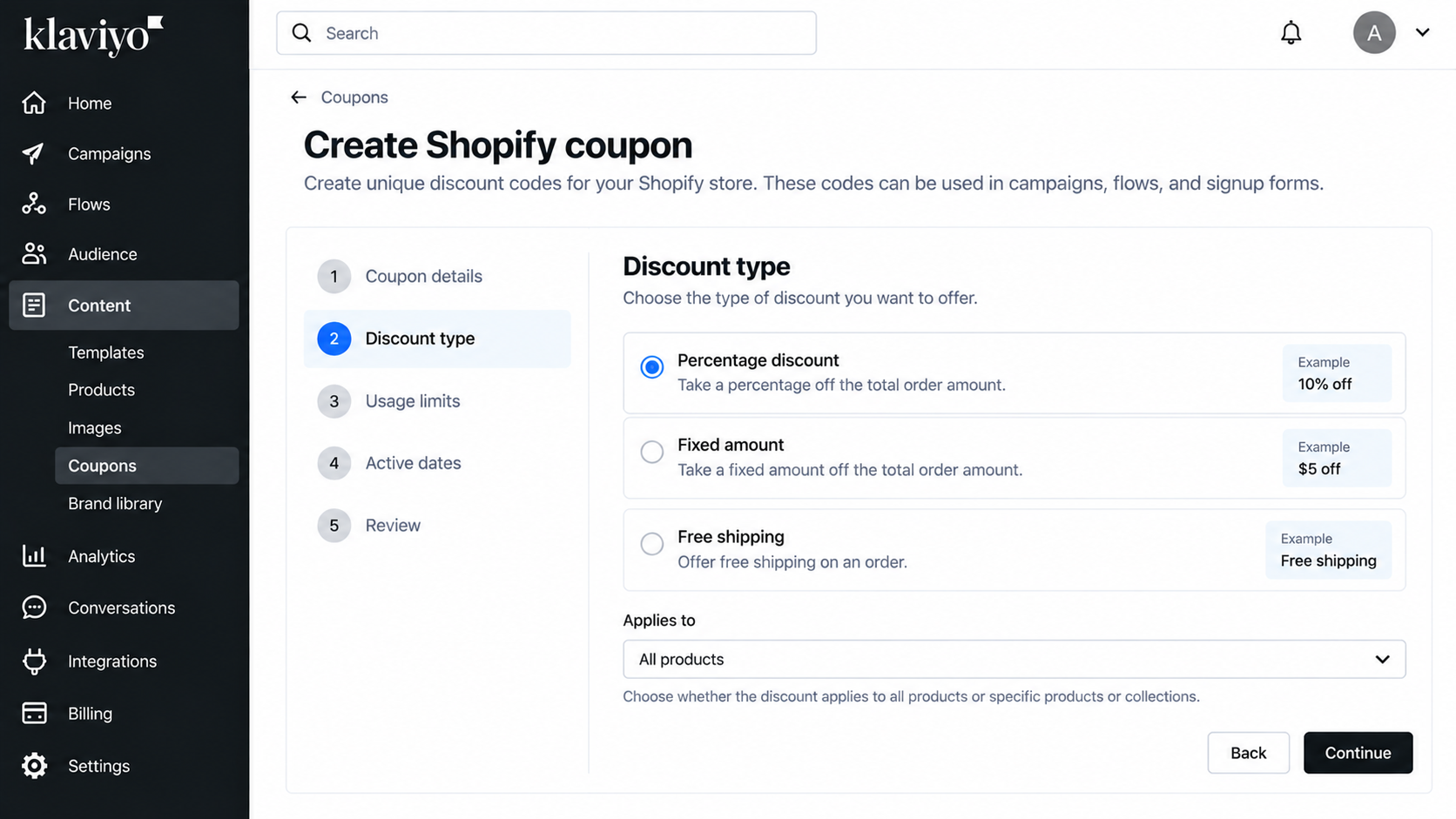
Shopify settings can also limit an offer to certain products or collections, which helps you protect margin.
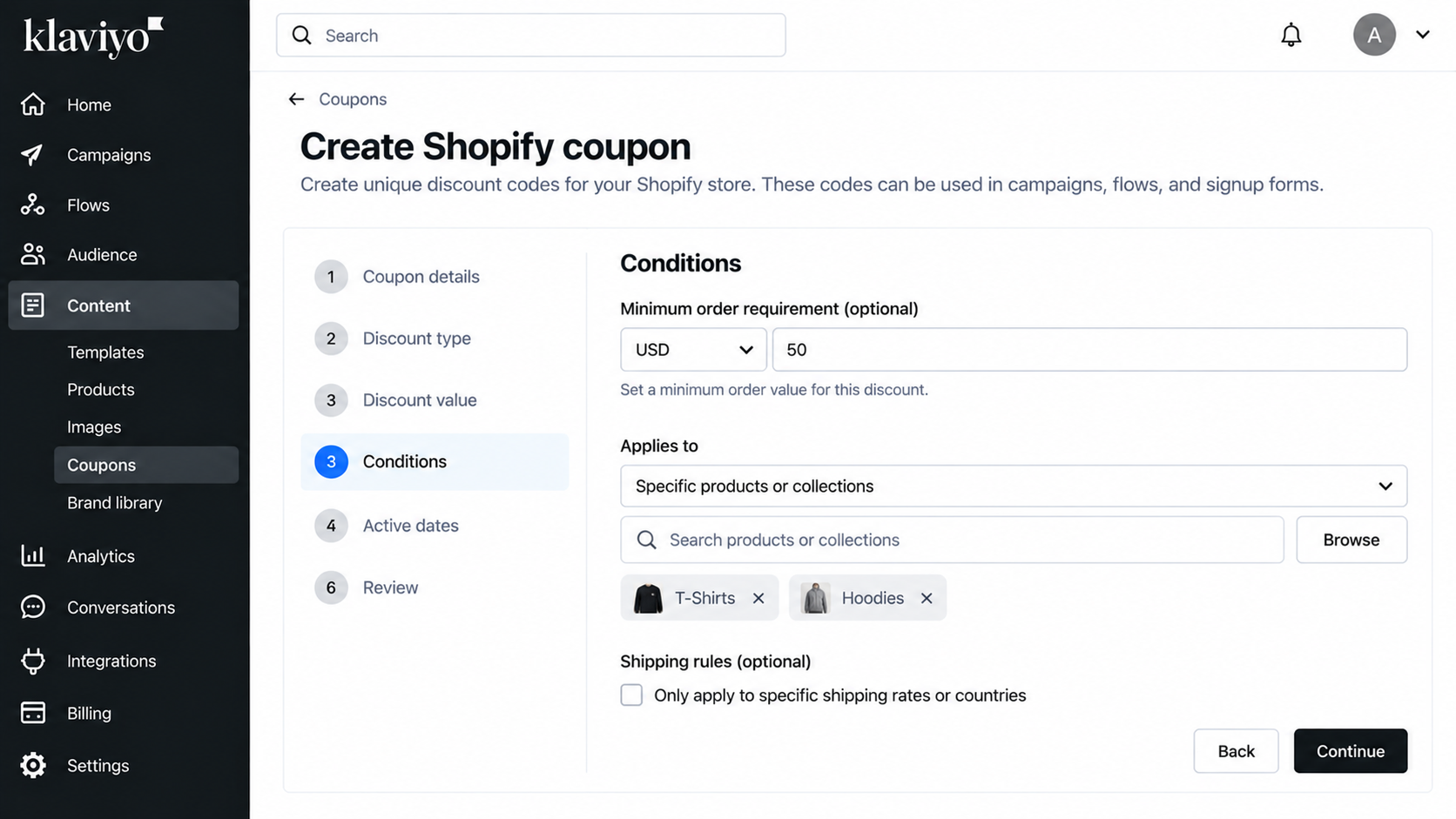
Step 5: Set the Discount Conditions
Discount conditions decide who can use the code and when, so think about them from a marketer's view.
- Minimum Order: Set a minimum spend so the discount always leaves you with a healthy profit on each sale.
- Eligible Items: Limit the code to chosen products or collections when you want to clear stock or protect bestsellers.
- Activation Timing: Choose when the code starts working, especially if your email will go out before a sale begins.
- Expiration: Add an end date, because a deadline gives shoppers a reason to act instead of waiting.
- Shipping Rules: Where shipping restrictions apply, confirm which countries or rates the discount can cover before you publish.
Step 6: Generate the Coupon Codes
A campaign needs enough available codes to cover your whole audience, and Klaviyo warns you if they fall short. Flows keep using up codes as new subscribers enter, so they need a steady supply of them.
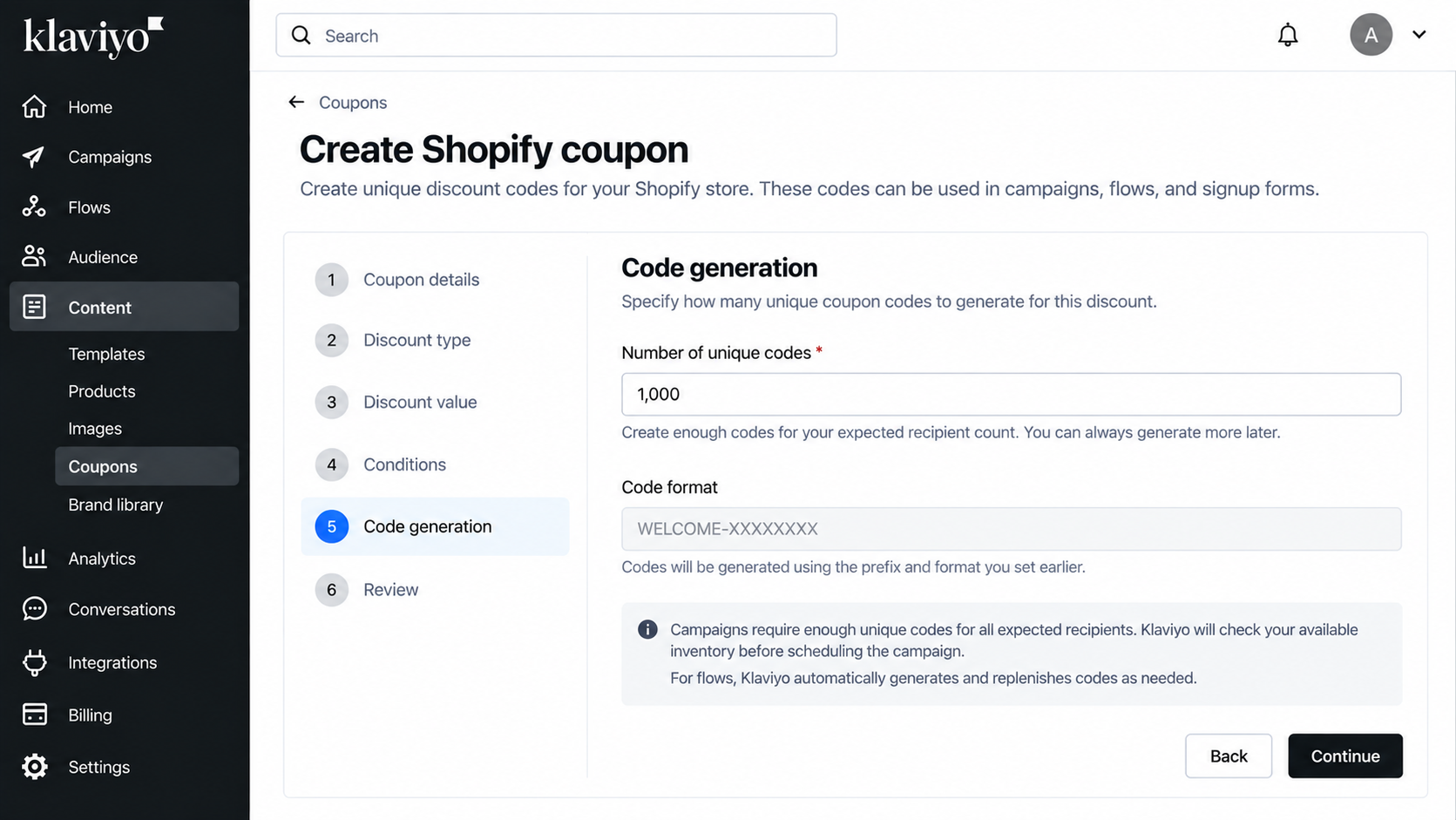
Important: Generate more coupon codes than your expected audience. A small buffer helps cover new subscribers, list changes, and resends without running short.
Step 7: Test the Coupon Before Going Live
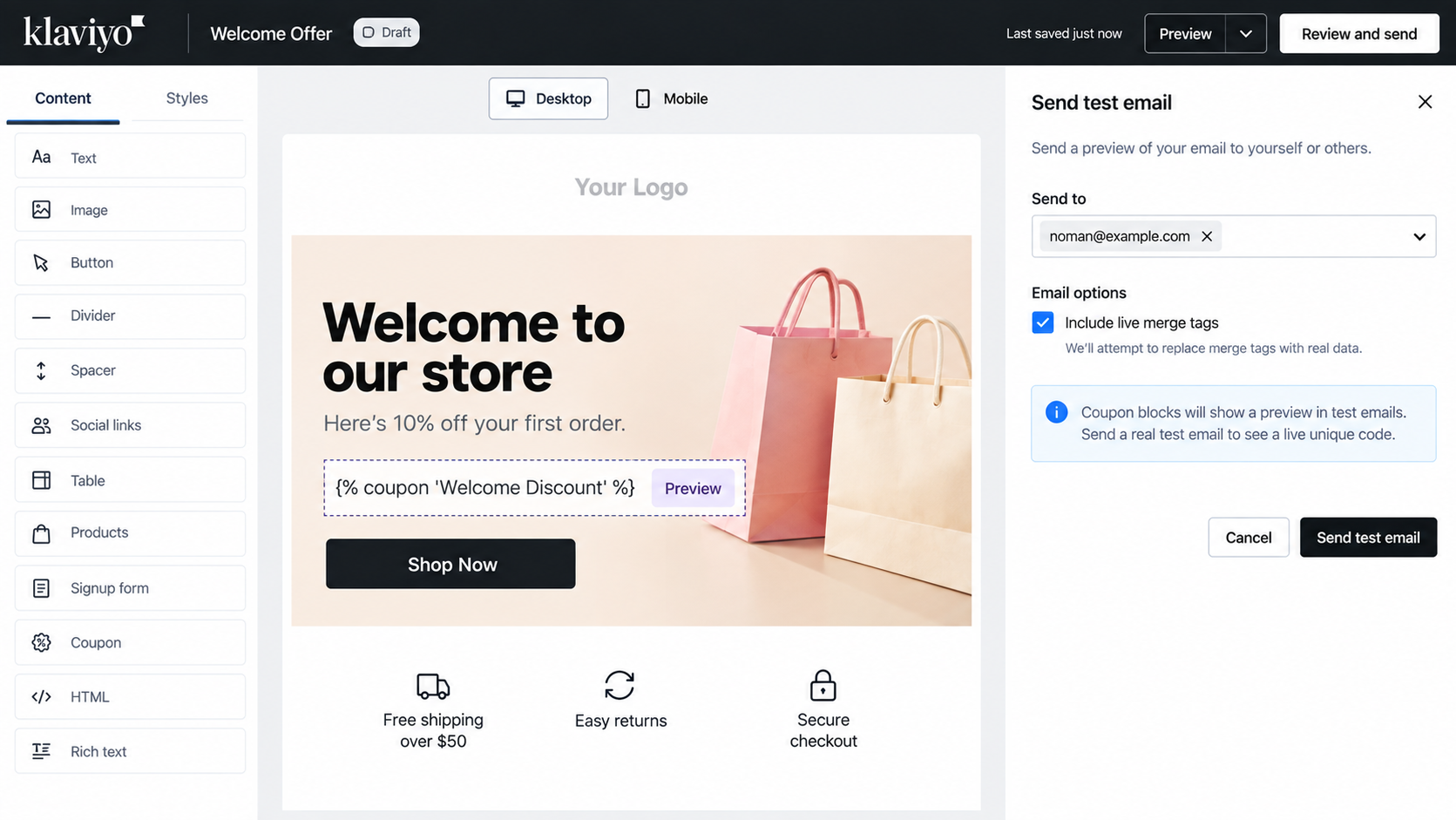
The editor shows the coupon name with a preview label instead of a real code, so nothing is broken. Send a real test to yourself, then click the code through to checkout to confirm the discount works.
How to Add a Klaviyo Coupon Code to an Email
Once your coupon is ready, getting the code into your email takes just a minute. You can use the personalization menu or the coupon block, and both show each subscriber their own code.
Add the Coupon Through Personalization
Open your email in the editor, then choose personalization and pick Coupons from the menu. Select the coupon you created, and Klaviyo will insert a template tag into your email text.
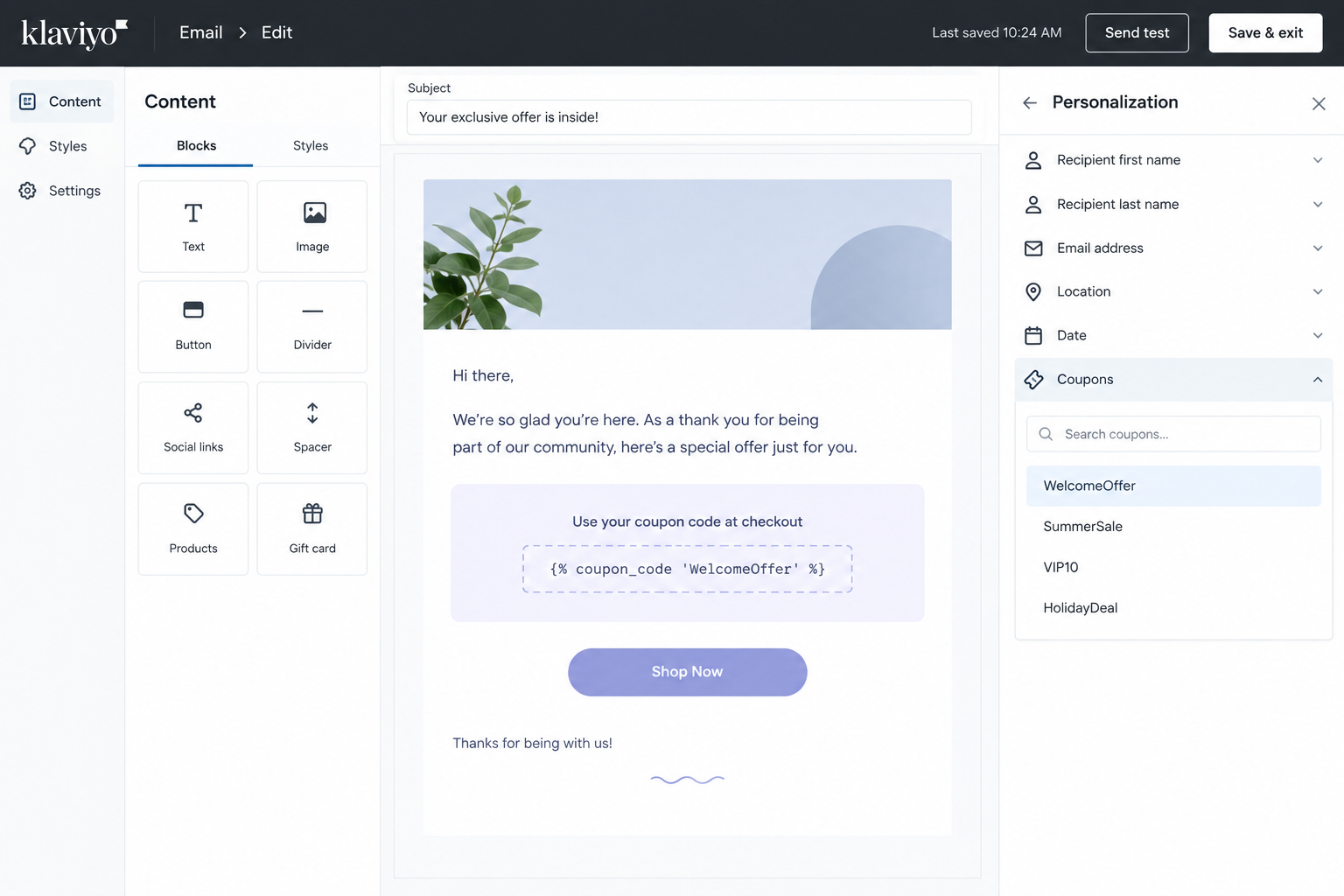
Klaviyo uses this tag to insert each recipient's assigned coupon code dynamically at the moment of sending. Replace CouponName with the exact name you gave the coupon, including capital letters and spacing.
Use the Klaviyo Coupon Block
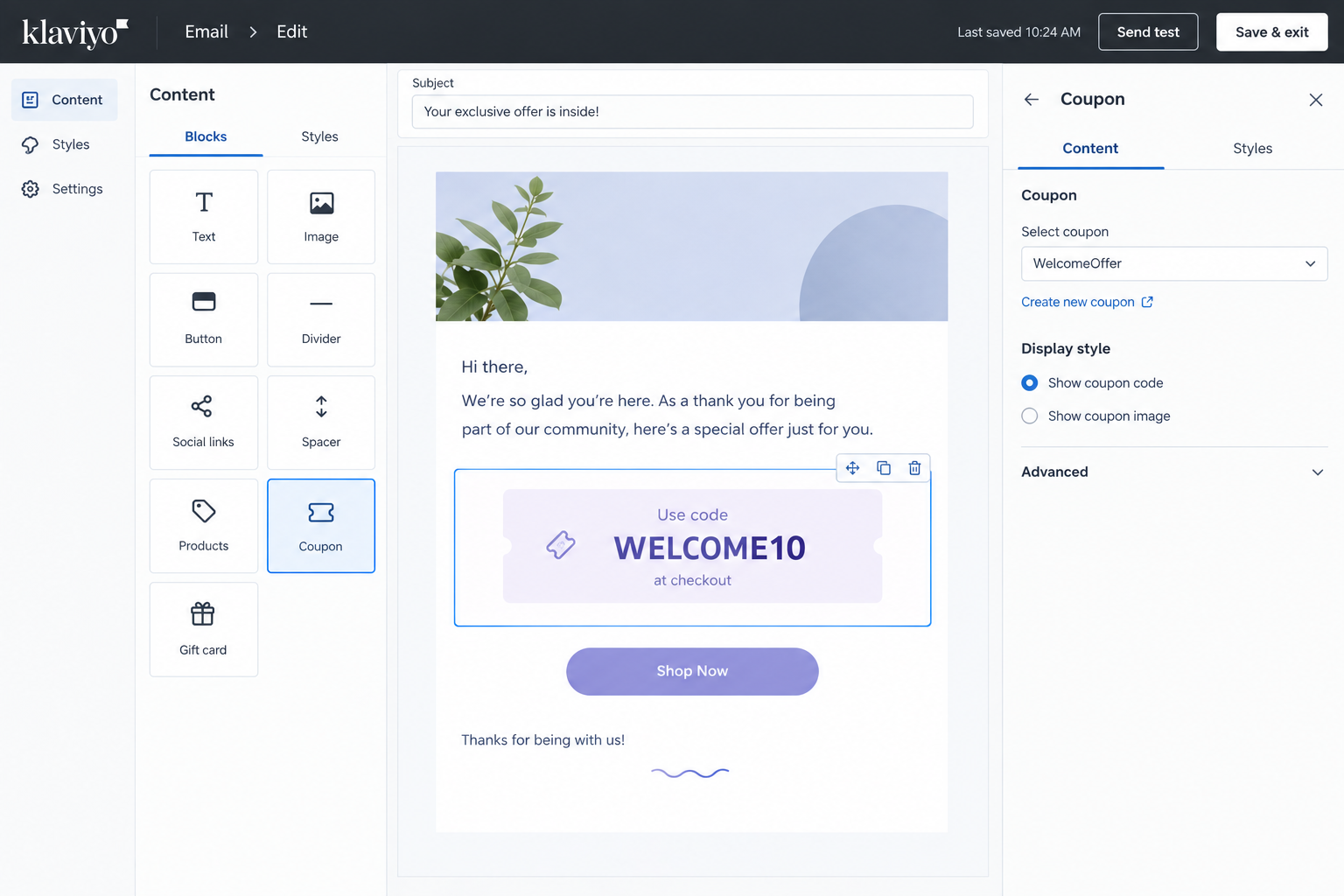
Klaviyo's drag-and-drop editor also includes a dedicated coupon block that displays your available coupon code. The block is easier when you prefer a visual approach and want fewer chances of typing errors. The manual tag works better when you want the code inside a sentence or a custom-designed section.
Make the Code Stand Out
Place the coupon near the top of your email, where readers see it without scrolling. Mention the expiry date right beside the code, because a clear deadline encourages faster action. Add a button that leads shoppers straight to the products the discount actually applies to. Keep the text around the code short, and explain the offer in one plain sentence.
How to Use Unique Coupons in Klaviyo Campaigns
Campaigns send once to a chosen audience, so careful preparation matters far more than speed.
Campaign Checklist
- Create Coupon: Build a fresh coupon for the campaign so its inventory and results stay separate from other sends.
- Generate Codes: Create enough codes for your full audience, plus a healthy extra amount as a safety cushion.
- Insert Coupon: Add the coupon to your email through personalization or the coupon block, using the correct coupon name.
- Check Inventory: Compare your recipient count with the available codes, because too few codes can block a successful send.
- Send Test: Send yourself a real test, open the message, and confirm the code appears and works.
- Final Review: Read the whole campaign once more before scheduling, including the audience, expiry date, links, and subject line.
Campaigns connect directly to revenue, and our guide on driving more revenue on Shopify through Klaviyo covers strategy.
Why Inventory Matters
Insufficient coupon inventory can stop a campaign from sending, which wastes time on launch day. Generating codes early also gives you time to test them in Shopify before real customers arrive.
Timing and Audience
Send unique coupon campaigns to a defined segment, rather than your entire list at once. Smaller segments use fewer codes, protect your margin, and make results easier to read afterward. Schedule the send so the coupon's activation and expiry dates cover the full sales window.
How to Use Unique Coupons in Klaviyo Flows
Flows send coupons on their own every time a customer hits the trigger, so they need a slightly different setup than campaigns. Here is how to add unique codes to automated messages, and where a discount actually earns its place.
Adding a Coupon to a Flow Message
Open your flow, select the message you want, and click edit to reach the email editor. Choose personalization, then Coupons, and select the coupon you prepared specifically for your automated messages. Use a separate coupon for flows, because Klaviyo recommends keeping campaign and flow coupons apart.
Where Coupons Make Sense
Not every automation needs a discount, so choose the flows where an incentive truly changes behavior.
- Welcome Flow: A first-order code helps new subscribers become customers while your brand is still fresh in mind.
- Cart Abandonment: Save the discount for a later message, so shoppers first receive a simple reminder without any offer.
- Browse Abandonment: Use a light incentive only for high-intent visitors who viewed the same products several times.
- Win-Back: Offer a personal discount to lapsed buyers after enough time has passed without a purchase.
- VIP Retention: Reward loyal customers with private offers that feel like a thank you, not a tactic.
Flow Timing Tips
Space your discount messages out so customers don't receive several offers in a short period. Add a flow filter or split so people who already purchased don't receive a discount. Review each flow regularly to check offer performance, expiration rules, targeting, and any skipped messages.
Shopify-generated flow coupons replenish automatically, while uploaded coupon pools need to be monitored and replenished manually. Small changes to timing and offer size often improve results more than a complete redesign.
How to Add Unique Coupon Codes to Klaviyo Signup Forms
A signup form can hand new subscribers their own discount code the moment they join your list. Shopify unique coupons can even land in the shopper's cart automatically, while other platforms need uploaded or API-based codes instead.
Setup Steps
- Edit Form: Create a new signup form or open an existing one from the Sign-up forms area.
- Success Step: Go to the success step, which is the screen subscribers see right after they join your list.
- Coupon Block: Add the coupon block to that step, then open its settings to choose how it behaves.
- Unique Type: Select the Unique Coupon option, then pick your Shopify coupon or an uploaded coupon set.
- Fallback Coupon: Set a fallback coupon where appropriate, so subscribers still receive something if unique codes run out.
- Publish Test: Publish the form, then sign up with a test email address and check that the code works.
Automatic Cart Application
For Shopify unique coupons, Klaviyo can apply the coupon to the shopper's cart after form completion. This removes copy and paste, and it usually improves the chance that the shopper actually redeems the offer.
Platform Limitations
Native unique coupons for WooCommerce, Magento 2, and PrestaShop cannot currently appear directly in signup forms the same way. In those cases, Klaviyo points users toward uploaded or API-based coupons instead, so plan for that early. Many generic guides miss this detail, and it can save you hours of confusion during setup.
Form Design Tips
Keep the success step simple, with one clear message and the coupon shown in large text. Tell subscribers when the code expires, so they understand the offer has a real deadline. Also send the code by email afterward, because some visitors close the form before copying it. Check the form on mobile, since most shoppers will see it on a small screen.
How to Send Unique Coupon Codes Through Klaviyo SMS
Unique coupon codes can also be used in Klaviyo SMS and MMS campaigns and flows, but the setup depends on the ecommerce integration. Klaviyo can generate SMS-ready unique codes natively for Shopify, Magento 1, and Magento 2. Other integrations may require codes to be generated elsewhere and uploaded to Klaviyo.
SMS Setup Steps
- Create Coupon: Create and generate the unique coupon first, just as you would for an email campaign.
- Add Tag: Insert the coupon with the same template tag, using the exact coupon name you created.
- Test Message: Send a real test text to your own phone and confirm that the code appears correctly.
- Count Characters: Remember that each code adds characters, which can push your message into extra segments and raise costs.
- Keep Stock: Maintain enough coupon inventory so every person who should receive a text also receives a working code.
Klaviyo allows only one unique coupon code in a single SMS or MMS message. Unique coupon codes also cannot be used in the SMS autoresponder under SMS settings.
One important limit is that an SMS message can contain only one unique coupon code. For wider tips on timing, frequency, and personalization, see our Klaviyo SMS marketing best practices guide.
SMS Message Tips
Start with the offer and the code, because most people scan text messages in seconds. Include a short link and a clear expiry date, then stop writing to keep the message tight. Respect consent and timing rules, and never text discounts to people who did not agree to receive them.
How to Automatically Apply a Klaviyo Coupon to a Shopify Cart
A Shopify discount link can apply your coupon the moment a shopper clicks your email or SMS button. That means no copying, no pasting, and fewer shoppers giving up before they reach checkout.
Why It Works
Automatically applying the discount removes the need for shoppers to copy and paste a code, making the path from the message to checkout simpler.
Mobile shoppers benefit most, because copying and pasting codes on a phone is genuinely annoying. Always test the final link yourself in a private window before you send it to customers.
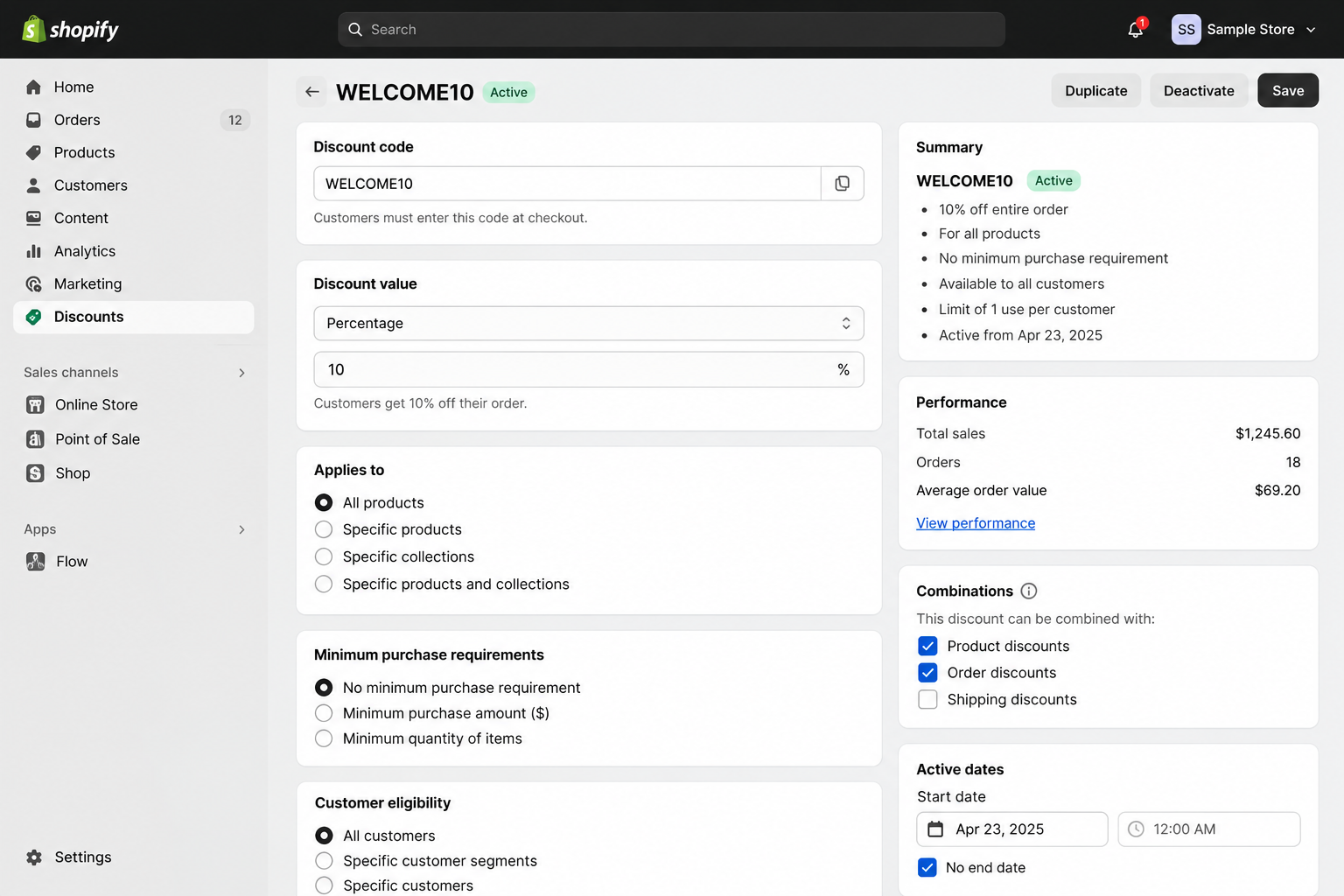
Apply a Coupon and Send the Shopper to the Homepage
Use this format when you want the code applied and the shopper sent to your homepage.
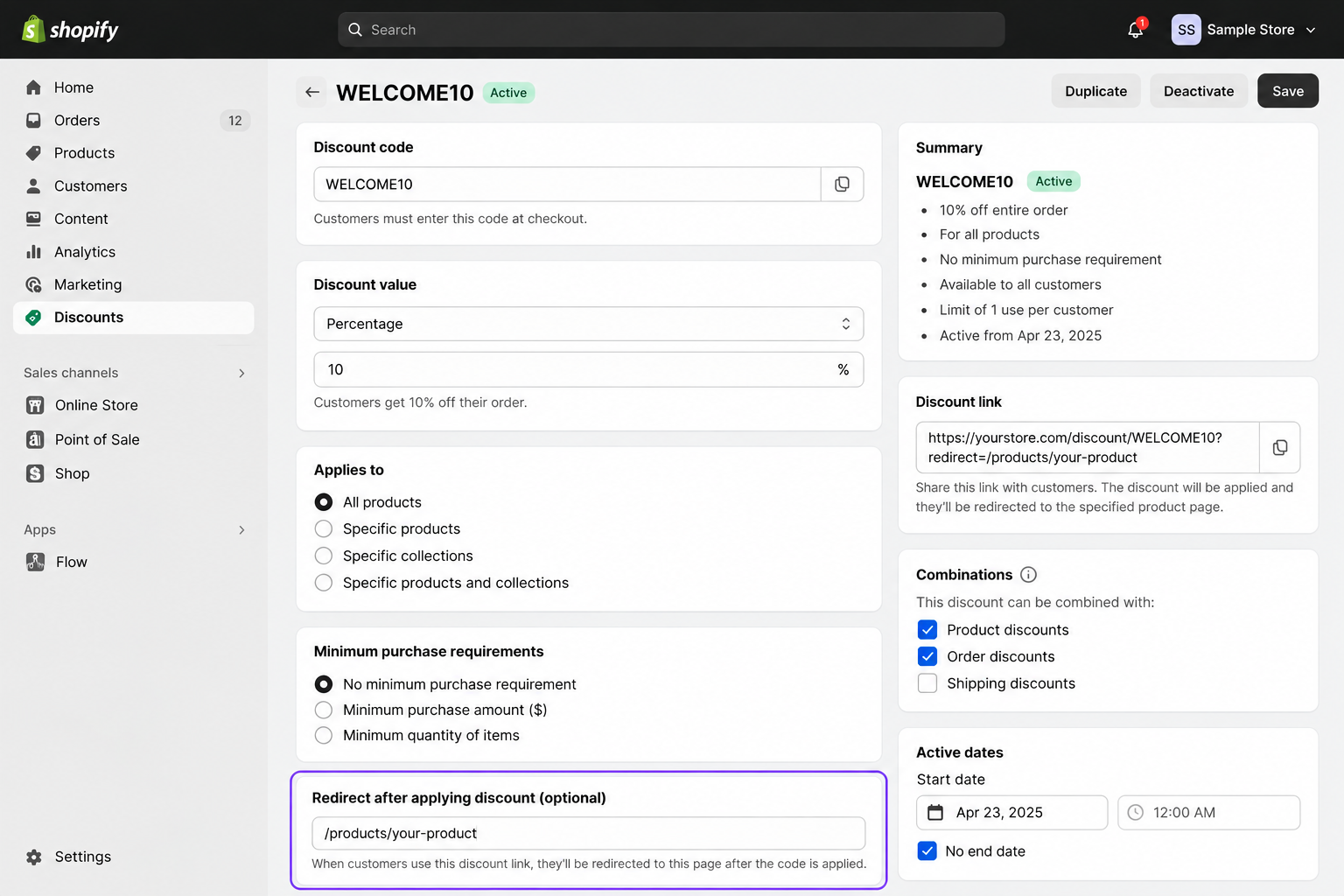
Apply a Coupon and Redirect to a Product Page
Add a redirect to the link when you want shoppers to land on a specific product page.
Use a Unique Coupon Inside the Discount Link
You can place the unique coupon tag inside the link, so each shopper receives their own applied code.
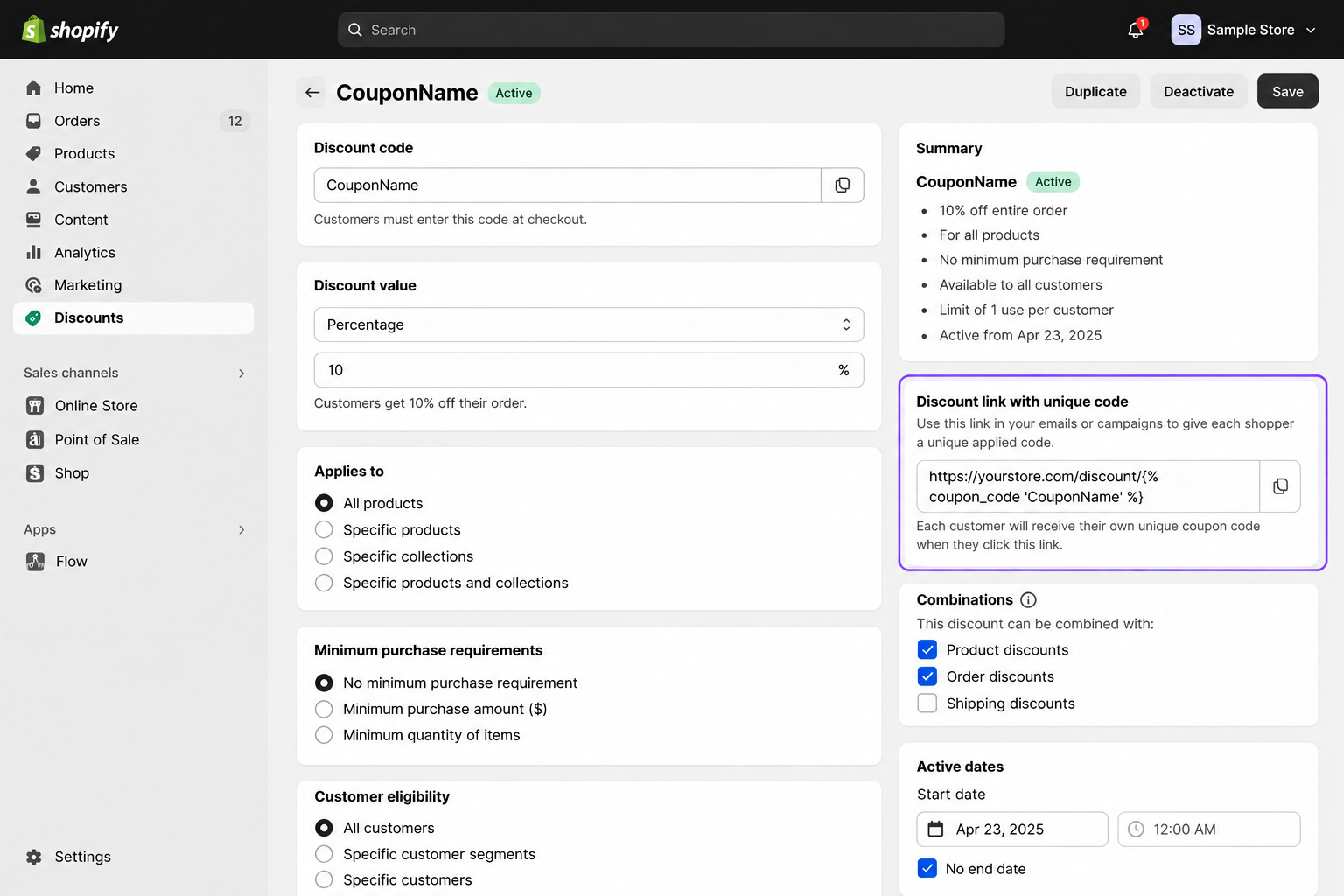
Keep the link short, test it carefully, and make sure the coupon name matches exactly. Even with automatic application, still show the code in your email, so shoppers can find it later.
Does Klaviyo Support Unique Coupons for WooCommerce, Magento and Other Platforms?
Yes, but the details change by platform, so this table shows what each integration currently offers.
Platform | Unique Coupon Support |
Shopify | Native Klaviyo generation with support across campaigns, flows, signup forms, email, and SMS |
WooCommerce | Native Klaviyo coupons for flow emails; campaigns require static or uploaded unique codes |
Magento 2 | Native Klaviyo generation for flow emails; campaign emails require uploaded unique codes |
PrestaShop | Native unique coupons with channel limitations; not supported natively in campaigns or signup forms |
BigCommerce | Generate codes externally and upload them to Klaviyo |
Other/custom platforms | Usually uploaded coupon codes or an API-based implementation |
What This Means for You
Klaviyo can generate unique codes natively for Shopify, WooCommerce, PrestaShop, and Magento stores, right from your Klaviyo account. Typically, codes must be generated elsewhere and uploaded to BigCommerce, or an API-based setup occurs with custom platforms. The maximum number of flows and channels you can have in Klaviyo depends on your integration, so please consult the documentation before building.
How to Upload Unique Coupon Codes to Klaviyo
Some stores, like BigCommerce, can't generate unique codes inside Klaviyo, but you can still use them. Create the codes in your store, upload them as a CSV file, and Klaviyo hands one to each subscriber.
Prepare the Coupon CSV
Create a CSV file with one coupon code per row, and make sure every code is different. Generate the codes in your ecommerce platform first, then export them so they match real discounts. Codes that exist in Klaviyo but not in your store will simply fail at checkout.
Create an Uploaded Coupon in Klaviyo
In the Coupons area, choose the option for uploaded coupons and give the coupon a clear name. Use a name that describes the offer, such as Welcome Upload or Spring Sale VIP.
Import Your Coupon Codes
Upload your CSV file, and Klaviyo will add those codes to the coupon's available inventory. Klaviyo currently allows externally generated coupon sets to be uploaded as CSV files and referenced in messaging.
Check Coupon Inventory
Review the remaining code count before every send, because uploaded coupons do not refill themselves. Upload a fresh batch when stock runs low, so no subscriber receives an empty or broken message.
How to Track Klaviyo Coupon Performance
Klaviyo lets you review coupon assignment and status information, while campaign and flow reports show the revenue attributed to the messages carrying those offers. For Shopify and Magento stores, Klaviyo can also capture specific discount codes used on placed orders. However, reporting has limits: you cannot filter or segment purchases by an entire unique coupon prefix or coupon set.
Metrics That Matter
- Assignment History: Check how many coupons were assigned, so you know how many people actually received a code.
- Code Status: Compare available, used, and expired codes to see how quickly your coupon inventory is moving.
- Revenue: Review the total revenue generated by each campaign or flow that carried your coupon offer.
- Conversion Rate: Track how many recipients bought after receiving the offer, compared with your normal, non-discount messages.
- Recipient Value: Divide revenue by recipients to see what each message is truly worth to your business.
- Redemption Rate: Measure how many assigned codes were used, because a low rate suggests weak targeting or timing.
- Order Value: Compare average order value with and without a discount to see whether it lifts basket size.
Reporting Limits
For Shopify and Magento, Klaviyo can pull specific coupon code details from your placed orders. There are limits, though, because you cannot analyze an entire unique code prefix or set as one filter. Use campaign and flow reports for the bigger picture, then check individual codes when you need detail. A regular review of your account helps, and our Klaviyo audit checklist covers attribution and revenue reporting.
How to Read Results
Compare coupon messages against similar messages without a discount, so you see the true lift. A high redemption rate looks great, but it can hide customers who would have purchased anyway. Watch profit after discount, not just revenue, because deeper offers can lower your real earnings. Repeat the tests over several weeks before you decide which offer deserves a permanent place.
Common Klaviyo Coupon Code Problems and How to Fix Them
Most coupon problems have simple causes, so use the problem, reason, and fix format below.
My Klaviyo Coupon Shows "PREVIEW"
- Reason: Klaviyo displays a preview label inside the editor instead of a real unique code, so nothing is broken.
- Fix: Send a real test email to yourself, and you will see the actual code appear correctly.
The Campaign Says There Aren't Enough Coupon Codes
- Reason: Your audience is larger than the available code inventory, so Klaviyo stops the campaign before sending.
- Fix: Generate additional codes before scheduling, and add a comfortable buffer above your expected recipient count.
Customers Are Receiving Expired Coupons
- Reason: Availability dates in Klaviyo and discount rules in your store may not match each other.
- Fix: Check both places, then align the start and end dates so customers never receive dead codes.
The Coupon Isn't Applying at Checkout
- Reason: Restrictions in your store often block the discount, even when the code itself is perfectly valid.
- Fix: Check these common causes one by one until the code finally works as expected at checkout.
The Coupons Tab Is Missing
- Reason: The ecommerce integration may be disconnected, outdated, or missing a permission that Klaviyo needs to continue.
- Fix: Open your integration settings, review the connection status, and re-authenticate if Klaviyo asks you to.
My Signup Form Isn't Showing the Unique Coupon
- Reason: Your coupon type or platform may not support unique coupons inside signup forms in that way.
- Fix: Check Klaviyo's platform notes, then switch to an uploaded coupon or fallback coupon if needed.
My Flow Has Run Out of Coupon Codes
- Reason: Coupon inventory behavior depends on the integration and coupon type. Uploaded coupon pools can run out, while supported native flow coupons may replenish automatically.
- Fix: Check the coupon's available inventory and the flow's skipped-recipient activity. For uploaded coupons, add more codes manually. For supported native coupons such as Shopify, confirm that automatic generation is working correctly and review any messages skipped while inventory was unavailable.
Prevention Tips
Most coupon errors come from rushed launches, so follow a short checklist every time. Keep a simple sheet listing each coupon, its purpose, its dates, and where it is used.
Klaviyo Coupon Code Best Practices
Small choices in how you build and send coupons decide whether a discount earns money or quietly loses it. Good coupon practices keep your codes working, your inventory healthy, and your margins safe on every send.
Coupon Setup Tips
- Create separate coupons for campaigns and flows, because Klaviyo recommends it.
- Make a new coupon for each major campaign to keep tracking clean.
- Give every coupon a clear expiry date, especially for welcome, cart recovery, and win-back offers.
- Keep spare codes on hand instead of generating exactly your expected recipient count.
- Add a fallback coupon to signup forms, so subscribers always see something.
- Test redemption as well as email design, because a broken code hurts trust.
Smart Discount Strategy
Segment customers before offering a discount. This helps you send offers to people who are more likely to respond instead of giving discounts to customers who were already ready to buy.
Avoid building your entire email strategy around discounts. Frequent discounts can reduce profit margins and train customers to wait for the next offer. Use discounts selectively for specific customer groups, campaigns, and buying situations.
Our guide to Klaviyo segmentation for ecommerce shows practical ways to build these groups easily.
Pre-Send Checklist
- Confirm the coupon name in your template tag matches the name saved in Klaviyo exactly.
- Check that your available codes exceed the recipient count by a comfortable margin.
- Match the activation and expiry dates in Klaviyo with your store's discount rules.
- Click through from a real test message and complete a checkout with the assigned code.
- Review your segment one last time, so only the right people get the discount.
- Open the test on your phone, because most subscribers will read it there.
A Simple Example
Picture a skincare store that wants more first orders without publishing a public discount code. It creates a welcome coupon with a ten percent discount, a seven-day expiry, and a clear prefix. The coupon goes into the signup form success step and the first welcome flow email. After a month, the team reviews redemptions, revenue, and order value, then adjusts the offer. Nothing fancy happens here, yet the brand gains control, clean data, and a safer discount.
When Do You Need Help With Klaviyo Coupon Setup?
A single welcome coupon is easy to run on your own. Once you add more flows, offers, and channels, the details pile up, and mistakes get expensive.
- Many Flows: Several flows using different incentives make coupon inventory and overlapping offers hard to track by hand.
- Integration Issues: Shopify or WooCommerce connection problems can break coupon creation, syncing, and revenue attribution without obvious warnings.
- Segment Rules: Poor segmentation sends discounts to the wrong people, which quietly reduces profit on every campaign.
- Custom Logic: Advanced discount rules often need careful coordination between Klaviyo, your store, and sometimes custom code.
- Channel Mix: Coordinating email and SMS offers prevents customers from receiving the same discount twice or conflicting messages.
- Reporting Gaps: Unclear attribution makes it difficult to know whether discounts create new sales or just reduce revenue.
Conclusion
A public discount code is easy to send, but just as easy to lose control of. Unique Klaviyo coupons fix that by giving each customer their own code, so your offer stays with the right people. The right setup depends on your store platform, message type, coupon stock, and the goal behind the promotion.
If you are just starting, pick one flow or campaign and build a single coupon for it. Generate extra codes, send yourself a test, and confirm the discount works at checkout before customers see it. Small, careful steps usually beat a big launch that nobody has tested or measured properly. Then watch the results for a few weeks before you add forms, SMS, or win-back offers.
Keep discounts for the moments that truly need them, so your profit margin stays healthy. The best coupon feels personal, protects your margin, and gives customers a good reason to come back.
Frequently Asked Questions
Can Klaviyo generate unique coupon codes?
Yes, Klaviyo can generate unique coupon codes directly for integrations with Shopify, WooCommerce, PrestaShop, and Magento. Other platforms like BigCommerce tend to use codes that you generate elsewhere and then upload using a CSV.
What is the difference between static and unique coupons in Klaviyo?
A static coupon is a single code that can be used by anyone and a unique coupon is a code issued to each person. Unique codes, are usually one-time use. This stops people from sharing them and gives you more control over your offers.
How do I create a unique Shopify discount code in Klaviyo?
Go to Content, then Coupons, select the Shopify option, name your coupon, and set the discount rules. Then, generate plenty of codes for your audience and send yourself a test before you go live.
How do I add a coupon code to a Klaviyo email?
Click on Personalization, Coupons, and then select your coupon from the options. There's also a visual option that can be used in the drag-and-drop editor using the coupon block.
Can I use unique coupon codes in Klaviyo flows?
Yes, you can use unique coupons in flows by adding them to a message through personalization. Make a single coupon for automated messages; have sufficient codes to hand out to new subscribers.
Can Klaviyo coupon codes be used in signup forms?
Absolutely, you can have Klaviyo coupons on sign-up forms, with Shopify unique coupons being an excellent option. For other platforms, like WooCommerce, Magento 2, or PrestaShop, you have to upload or integrate API based coupons in the forms.
Why does my Klaviyo coupon say PREVIEW?
The word preview appears because Klaviyo does not show a real unique code inside the editor. Send a test message to see the working code, and recipients will see a real code instead of the label.
Can Klaviyo automatically apply a Shopify discount code?
Yes, a Shopify discount link can apply a static or unique coupon when shoppers click your button. You can also redirect them to a product page, which makes the offer feel more relevant.